
There are built-in features/plugins available to Backup Chrome bookmarks or to backup Firefox bookmark etc. But bookmark backup tools or bookmarks sync tools that supports most of the browsers are really helpful. Keeping a backup of your browser bookmarks is always a good idea.
Bookmarks helps you save and organize URLs or website links that you think are useful or important. There are many tools which allows you to backup bookmarks or sync and share bookmarks across multiple browsers. There are tools that allows you to store and manage all your bookmarks online. Social bookmark manager like Delicious can be used to add bookmarks to your list and categorize them. Delicious is the worlds biggest collection of bookmarks.
Bookmarks are different from Bookmarklets. “Bookmarklets” are JavaScript programs stored as bookmarks that can be clicked to perform a function. Checkout thepassword revealer Bookmarklet.
Let us check few Bookmarks Backup tools that allows you to backup the bookmarks across the browsers. These software supports most of the popular internet browsers like Microsoft Internet Explorer, Mozilla Firefox, Google Chrome, Opera & Apple Safari. These tools also supports restore of the backed up bookmarks.
Browser Bookmark backup tools
Bookmarks Backup
Bookmarks Backup is a freeware tool that supports Microsoft Internet Explorer, Mozilla Firefox, Google Chrome, Opera and Apple Safari. After installation you can select browsers whose private data you would like to backup. Next select the Backup Folder on your computer which is the location where you would like to store all this data. 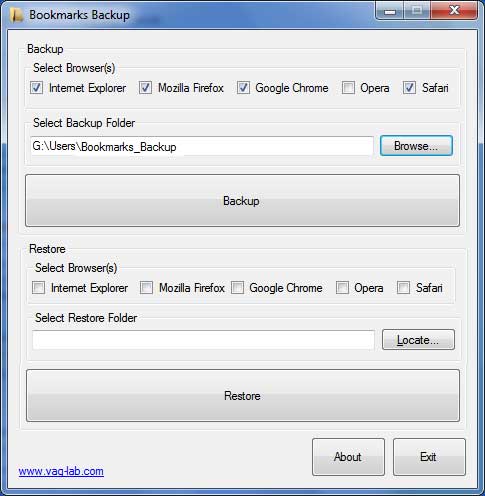
The very simple UI and has backup and restore options. You can backup bookmarks and other data from one or multiple browsers at once.
Download Bookmarks Backup.
Transmute
Transmute is a bookmark converter that enables you to convert your bookmarks and favorites between Google Chrome, Mozilla Firefox, Microsoft Internet Explorer, Safari, Opera, Flock, Seamonkey and Chromium. Transmute allows you to do automatic backups and it eliminate duplicates and also you can transfer between web browsers. Transmute works with all of the major browsers and other bookmark formats including Microsoft Internet Explorer, Mozilla Firefox, Google Chrome, Opera , Apple Safari , Konqueror, XBEL,Google Bookmarks, Delicious, Delicious/Yahoo! etc.
The free version supports all major bookmarks formats and also does automatic backups.
Download Transmute here.
Magic Bookmarks
Magic Bookmarks is another bookmarks backup tool. Magic Bookmarks is a portable bookmark manager that enables you to access all your favorite web links from an icon in the system tray. The program can open your links either in IE, Firefox, Opera or a custom browsers. Multi-user support is one of the good feature of Magic Bookmarks.
Download Magic Bookmarks .


Before you go, subscribe to get latest technology articles right in your mailbox!.
Chrome: Wrench icon–>Bookmark Manager–>Organize–>Export Bookmarks.
Choose destination folder and poof- you are backed-up.
All for desktop, nothing for mobile.