
Microsoft’s Sysinternals Autoruns for Windows v10.01 is a great free tool that allows you to manage startup programs. Windows Autoruns shows you what programs are configured to run during system bootup or login, and shows you the entries in the order Windows processes them.
Autoruns gives you more features than the MSConfig utility bundled with Windows Me and XP. MSConfig or Microsoft System Configuration Utility, is a utility to troubleshoot the Windows startup process.This is called System Configuration in Windows Vista and Windows 7.
Sysinternals Autoruns is the most comprehensive startup manager for Windows 7, Vista, and Windows XP.
When you install new programs few of them will install themselves as a startup program. This may not be necessary and they only eat resources and slow down the computer without being really useful.
Moreover some of the spyware launch as Startup program. If you are suspicious about the startup programs you can check them using the Autoruns and delete or disable them. (But your antivirus programs should protect you from these spywares).
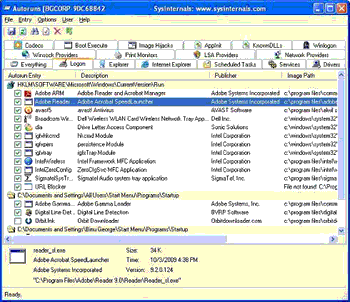
In the startup programs if you don’t want an entry to active the next time you boot or login you can either disable or delete it.By unchecking an entry you can disable it. By choosing Delete in the Entry menu you can delete items that you do not wish to ever execute.
Autoruns works on Windows XP and higher, including 64-bit Windows.In the package that you download will have Autoruns and Autorunsc.Run Autoruns and it shows you the currently configured auto-start applications. This will also display the full list of Registry and file system locations available for auto-start configuration. Autorunsc is the command-line version of Autoruns.
DOWNLOAD Sysinternals Autoruns


Before you go, subscribe to get latest technology articles right in your mailbox!.