
Most of us must have experienced the embarrassment caused due to missing outlook email attachments at least once in our professional life. Missing Outlook email attachments is a common problems and there are some tools and workarounds that solves the problem to certain extend.
Microsoft Office Labs now offering a plug-in, “Forgotten Attachment Detector”, for Microsoft Outlook that will make your life easier by reminding you to attach the files.
How FAD works?
Forgotten Attachment Detector or the FAD checks for keywords in the mail that indicate “attachment“. If there is any indication and no attachment is added then FAD will pop-up a message reminding you about the missing outlook email attachments. See below.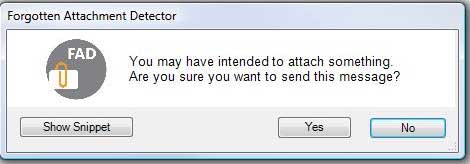
Click on “Show Snippet” will show you the message snippet that has an indication of attachment. For every Outlook email thee Attachment Detector plug-in for Microsoft Outlook checks for particular keyword phrases. The Forgotten Attachment Detector is pre-configured with a set of attachment-related keywords. FAD also allows you to add custom keywords that should trigger alert.
The FAD tool also provides an option to alert when email subject is missing.
The Forgotten Attachment Detector is really useful and helps you to avoid the embarrassment caused by the “Where’s the email attachment?” response from the recipients.
System Requirements
- Windows XP, Windows Vista or Windows 7
- Outlook 2007
- .NET 3.5 SP1
- VSTO 3.0
FAD requires VSTO 3.0 runtime (Visual Studio 3 for the office systems runtime ) to be installed on your computer. During installation it will ask you to install VSTO 3.0 if you don’t have that in your machine. VSTOR30.exe installs the Visual Studio Tools for the Office system 3.0 Runtime, which is required to run VSTO solutions for the 2007 Microsoft Office system built using Microsoft Visual Studio 2008.
For non-English version of the operating system you should also install the appropriate language pack to see the text of the messages from the VSTO run-time.
Download Forgotten Attachment Detector


Before you go, subscribe to get latest technology articles right in your mailbox!.