
Have you ever wondered how to keep a trial version forever or use trial software forever without using any crack or serial number? There are millions of software trial versions available to download that works with full features for few days or weeks. Once the trial period is over you need to buy the shareware version of the software or get a license from them. Usually the freeware version of shareware software will have only limited features.
But using trial versions forever may not be a good idea considering the moral side of it. People invest time and money to design and develop software applications. So it is always a good idea to use the genuine version of the software as far as possible.
But there is a tiny application that helps you to run trial version software forever without cracking the trial version of without purchasing a serial number. In almost all scenario trail version software expires based on the current value of system dates. If the software doesn’t maintain an internal timer clock then it depends on the system clock.
How to Keep a Trial Version Software Forever
Time Stopper is a small application that helps you to extend the trial period. Time Stopper works with any software executable file and practically will extend the trial period of the program for an unlimited amount of time. After installing the software browse for the executable file of trial program and select the new installation date. After doing this your program trial period will be automatically extended many more days, depending on the software.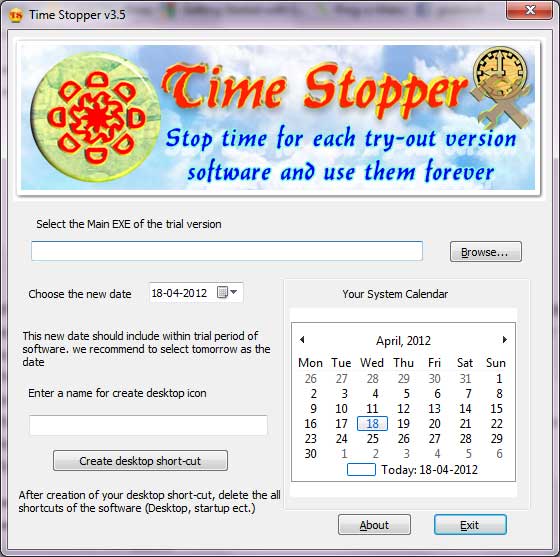 You need to set the new date within the trial expiry date. You should create desktop icon and if the original software has desktop or startup folder shortcuts delete them and never use start menu link to open software.
One good thing about the software is that, it will not modify the time and date of the operating system, therefore is safe to use.
Time Stopper supports the following operating systems.
- Windows NT
- Windows Me
- Windows 2000
- Windows XP
- Windows 2003
- Windows Vista
- Windows 7
You can download Time Stopper and a how-to guide available here


Before you go, subscribe to get latest technology articles right in your mailbox!.
currently i am using one month of trial version anti virus and after one month it will not do work than can i use it again or not please suggest me.
It’s virus ridden – Google it