
Windows NTP Sync (Network Time protocol) is a protocol used to synchronize clocks over the Internet. Windows 7 clock sync, Windows XP atomic clock sync etc follows similar process.
Sometimes you many need to update or synchronize your system time with that of the atomic clock to keep your system time up to-date. How to update and synchronize your system clock (computer clock) with the atomic clock time servers? Certain programs (like evaluation software or time sensitive programs) will not work if your system clock is not up-to-date. In windows you can do it manually or there are many free tools available in the internet to Synchronize Your System Clock to an atomic clock and Time Servers.
How to synchronize your system clock in Windows?
Windows system includes a tool to automatically update the time from an NTP server every week.It is easy to synchronize system clock in windows. See how to do this in Windows XP and Windows 7. You can synchronize date and time with internet time server in few simple steps.
- Right click on the system tray clock and choose “Adjust Date/Time” This will open Date and Time Properties dialog box.
- Alternatively you ca double click system tray clock to open the Date and Time Properties dialog box.
- If you do not have time and date in system tray you can try the following,
- Click on the Start menu, choose Run and type timedate.cpl and press OK. This will open the Date and Time Properties dialog box.
- In the Date and Time Properties dialog go to Internet Time tab.
- Check the box labeled “Automatically synchronize with an Internet time server“.
- Select the time server of your choice and click “Update Now“
- Click apply and then OK. See below.
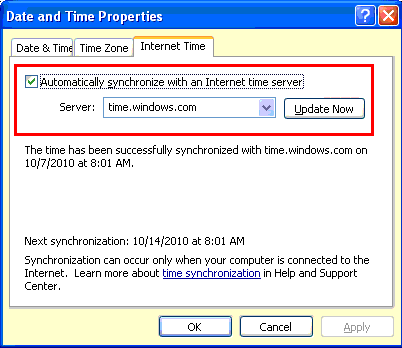
WIndows 7 clock sync
- In WIndows 7 Under the Internet Time tab, click Change Settings
- Check the box labeled “Synchronize with an Internet time server“
- Select the time server of your choice and click “Update Now” . See below.
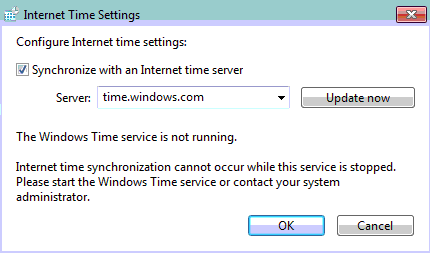
- Click apply and then OK.
Other Tools: Chronos Atomic Clock Synchronizer
The Chronos Atomic Clock Synchronizer connects to various atomic clock time servers and synchronize your internal clock with time provided by the time servers. In this tool you can configure server connection interval and also you can add new time servers. It automatically synchronize and update your system clock to accurate atomic clock time using different time servers which are within 1 second of coordinated universal time, as maintained by an atomic clock. See the screen-shot below.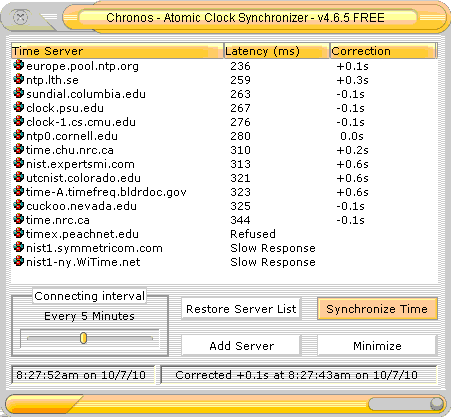
System support:
Windows XP and all others Windows versions.
DOWNLOAD Chronos Atomic Clock Synchronizer


Before you go, subscribe to get latest technology articles right in your mailbox!.
How to Synchronize Windows System Clock with Internet Time Servers? | Globinch – just great!