Restricted internet access or restricted site access is part of any organizations internet access rules. To implement any organizations internet access rules, filtering and censorship on internet access are properly defined by administrators. This forbid access to non business related sites. These filtering and censorship also ensure that people do not download or upload classified data.
But most of the time these strict censorship becomes a problem and people try all possible options to overcome these restrictions to connect to the required websites whether good or bad..
There are many proxy sites are there in internet that allows anonymous browsing. But your network administrator can easily block all these proxy sites.But still there are some smart software that can help you to overcome all these restrictions. The most famous one is UltraSurf.
UltraSurf is a lightweight executable program that is designed to overcome internet filtering and censorship. It enables the users to access any website freely. It uses Internet Explorer browser in the foreground and a proxy server in the background.
Related Article:
Some of the anti-virus software reports it as a Trojan but most of them (Read: Top Ten AntiVirus software programs) cannot detect the software. The main reason for this is that, the software requires no installation. It is a green software. You need to unzip the file if you download the zip version. Double-click the UltraSurf executable file to start UltraSurf program.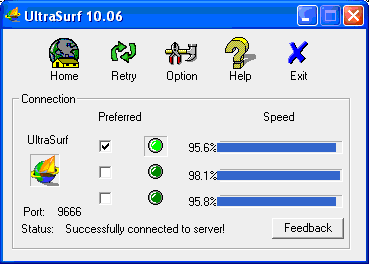
If you are using Firefox as your web browser then you need to download the firefox add-on. The UltraSurf adds a golden lock near the task bar. You can hide this also by selecting the “Hide Golden Lock” option from the Options window. There are many option available to configure.
Symantec has given a step to step guide on How to Block UltraSurf based on the different fingerprints for the Ultra Surf variants using SEPM (Symantec Endpoing Protection manager Console).
But still it is difficult to block this program. You can try it out to access any sites in your restricted environment.
Download UltraSurf


Hey if i use ultrasoft, does the administrator can detect what i am surfing.
Is there any other ways to use facebook chat when blocked
as i have already tried meebo, digsby and also linking with hotmail. All of them are block.
can facebook chat be connected to gtalk
as gtalk works perfectly
According to UltraSurf website "UltraReach uses advanced technology for encryption. All the contents are encrypted. No third party can detect what websites you are visiting. Privacy is our first priority. "
and
"UltraSurf uses advance proxy technology. It will hide your real IP from all websites. "
M trying too use ultrastaff bt m facing a problem when ever i run ultrastuf after it i can't brows any thing it seem's like my net not going on….
will u plese help me……..
we cannot download ultrasurf.
It is blocked
we cannot download ultrasurf.
the site is blocked
I use this to get on blocked sites:
http://www.highspeedvpn.com/
Never tried Ultrasurf though. Is it free?
Thanks for the link. Yes Ultrasurf is free
I could open youtube here in my college…thanks a lot…I didnt know about ultrasafe…i had tried tons of proxies earlier….but wasnt successful/…..thanks again
Hi Prem,
Glad to know that the free software helped you. Keep visiting
thanks man.. works like a snap of finger,,, thanks again
Thanks for your comments:)
You could also try a VPN service.
Do I Need to install ULTRASURF…or is it just Click -n- Go kinda software..????(*coz..in my office i cant install third party softyzz…)…..in such a case i ll be DOOMED…!!
I am using ultrasurf because it requires no installation.We can launch the application from our pendrive and it starts running.
Can you pls. send me ultrasurf through email tanir2002@yahoo.com i can't download it the site is also blocked
thanks
Hi i cant download even the ultra surf ,, even that is too blocked…. what can i do .. i use a laptop..
no not working on my system… cannot find page. error.