
 The other day I encountered “XML Parsing Error: XML or Text Declaration Not at Start of Entity” error when I accessed Globinch blog RSS Feed. Till the previous day everything was OK. Because of this error Globinch Feedburner feed got problems and was not delivering the daily updates to the readers. It took me almost 12 hours to fix this.
Why : XML Parsing Error: XML or Text Declaration Not at Start of Entity
In a well formed XML the XML Prolog (starts with “<?xml … ?>”), if present, should be the first entry of the file. There should not be any blank line before the XML Prolog. So if you have a blank line just before the “<?xml version=”1.0″ encoding=”UTF-8″?>” You will encounter the above error. See the screen shot below.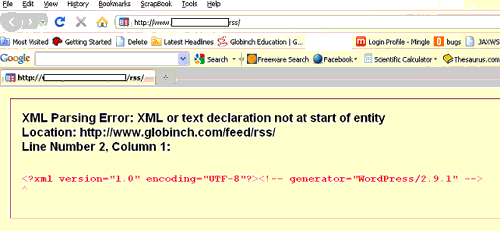
I searched many blogs and discussion forums. Most of them suggested to check the “wp-includes/feed-*” files for blank lines. I checked all those files and uploaded if necessary. Some blogs suggested to add some scripts which will remove the new line and tab characters from the generated string. I tried all these but the RSS error was still there.
Fix for XML Parsing Error
The question is who or which script file is introducing the blank line in the RSS XML? Unfortunately it is very easy to introduce that bug in PHP. If any of your PHP file (may not be directly related to feed) has a blank line before or after (outside) bracketed sections (<?php and after ?>) causes the issue.
This can introduce the blank line in the feed RSS.
Possible Fixes
1. Using WordPress plug-ins
There is a wordpress Plug-in “fix-rss-feed” available that can be used to fix the RSS feed.
Download fix-rss-feed plugin from the wordpress repository.
- Download the plugin from above download link.
- Unzip and upload it to /wp-content/plugins directory.
- Change the permission of your all .php files to “777” for time being.This will help the plugin to remove the blank lines from the files if the files are writable.
- Go to your dashboard and activate the plugin and follow the instructions to scan the files and to fix the blank lines.
- Once the process is over change the permission of all the .php files back to the original (“755”).
I tried this solution, unfortunately in my case this plugin didn’t help me. It did removed many spaces in many .php files but the RSS error was still there.
2. Deactivate your plug-ins one by one
This is the second step I tried. It was suggested in many blogs and forums. I deactivated each plugin and checked and activated them again. But this procedure also did not help me.
3. Check your files manually.The final solution
Finally I tried another approach. I sorted all my .php files which I had changed in the last two days. I found that only one file I changed, It was functions.php in my themes folder. I check for blank lines, there were none. Finally I found that there is a space after one “?> “ php close tag. Removed it and uploaded the file using FTP. Checked the RSS Feed. It was perfect!
So you can try all these options. Find out the PHP files which you changed just before you encountered this error and remove any blank lines or space in that file before .


Before you go, subscribe to get latest technology articles right in your mailbox!.
Thanks for writing this up.
I was clueless about this 🙂 . You helped me now to resolve this.
@Molend
Glad to know these tips helped you
Update: Yes it was the functions.php that was the culprit.
Thank you very much… It works!
@RedEyeThanks for your comments
Thank you very much… It works!
@CoolbloggerThanks for visiting
I had the same problem… and the fixed it. I installed fix-rss-feed plugin. It worked!!
Thnx
Yep, functions.php here as well.
Thanks so much for your article!
@NeelNGlad to know that the post helped you!
Yes most of the times the problem is in the function.php file !
Your article help me to slove the problem..
Thank you very much… It works!
In my case, it was also the functions.php file.
It was a blank line between two blocks of PHP, not at the beginning or end of the file.
I had the same problem in functions.php. It was a blank line between my additional function to handle register_sidebars that I added earlier. I looked high and low for a solution, I did come across a mention of the functions.php file but I just could not believe it. I was wrong. it works fine. I only had a problem with firefox. It worked in IE. I only had a problem with rss2. rss worked fine as well. Anyway, glad it is fixed. BTW the wordpress plugin to fix the problem did not work. Only changing the extra line in funcitons.php worked.
@Steve
Thanks for visiting globinch and happy that your issue got resolved !
Thanks!!! I had the extra space in functions.php… Geez, picky they are, huh? 🙂
@Julie
Sometimes PHP behaves like that! Some extra space may kill your extra days!!
The extra space in functions.php was definitely it! Thanks so much.
@Joseph,
Thanks for visiting and glad to know that this post helped you.
Binu George
I had the same problem, nothing worked. Tried looking for whitespace in functions.php. none. Tried the plugins one by one, nothing. Even tried the fix-rss plugin.
Following your advice I looked in the feed.php (wp-includes) and I noticed there was no endtag '?>'. Added that and it worked.
n ightmare of the same problem. I sent through ALL the php files, disabled plugins for all, changed themes, and nothing. I have 2 blank lines ABOVE the entire feed so it wont work. All the feed files show no spaces or blank lines. It's my Rss2 feed that is messed up. Any ideas? Here is what the top looks like of the feed page: Top 2 spaces are blank for some reason.
THANKS!! You helped me mate!!
Thanks you helped me 🙂
Thank you I have translated the tutorial almost via Google and I’m glad this tutorial has helped