As discussed in the previous post Blocking Websites or how to blockURL is a common problems mainly faced by parents and employers.
Many parents worries about children wasting time on the Internet by chatting and browsing through inappropriate contents.Children could be interacting with complete strangers and even sharing personal information and this should be controlled to avoid unwanted consequences.
We have discussed about How to Block URL or Web Site in Internet explorer in the last post.
Read: How to Block URL or Website in Internet explorer?
Option available in Firefox browser to Block Websites
FoxFilter Add-on for Firefox
FoxFlter is known as the Parental control for Firefox.FoxFilteris a personal content filter that helps block pornographic and other inappropriate content.The free version supports web filtering and this is enough for blocking website and their URLs.But if you want to protect these configurations by adding a password then you need to register to avail Premium features. Premium features are available with small support fee.
DOWNLOAD and INSTALL FoxFilter Add-on from mozilla.org.
After installation go to Tools -> FoxFilter Settings
A new web page will open there you can set the keywords in the Settings menu as below.The keyword should be the keywords of website URL that you want to block.For example if you want to block Facebook add “facebook” in the keyword list.Also under the sensitivity settings you can set the sensitivity of the keyword. Bottom line, the most sensitive approach is to examine the Body content where it will check for the presence of keyword in the body content 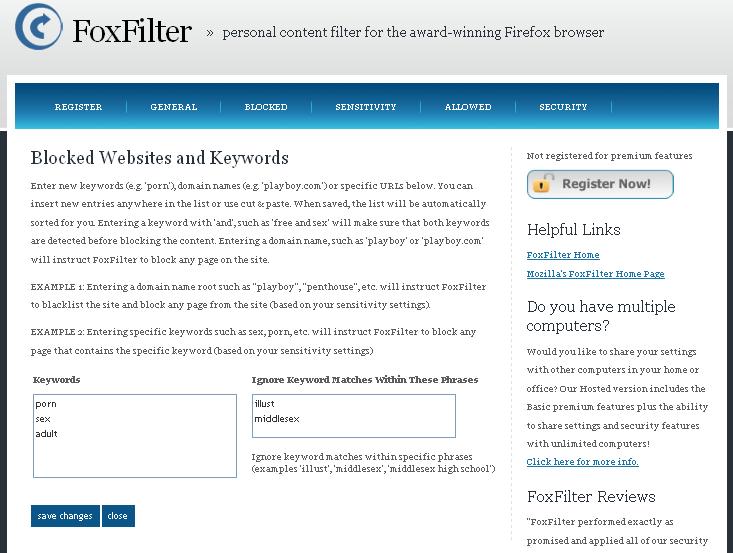


lklk
really useful information
please show the sequence of blocking unwanted sites in google chrome
and mozilla firefox
also please insted of blocking by the browser the google chrome
and mozilla firefox themselves are requested to ensure the need of the bowser family computer
waiting for reply after four hours
Hi Nagarajan,
If you want to block indiidual sites in Mozilla or Chrome you need to use add-ons or Plugins. Internet Explorer browser has inbuilt support (Content advisor)for blocking unwanted websites(Read: https://www.globinch.com/2010/06/27/how-to-block-u…. If you want to block websites across all the browsers, you can configure them in Firewall (Read : https://www.globinch.com/2010/07/06/best-freeware-… even you can configure them in most of the antivirus programs.