
Facebook Likes and Twitter followers not only helps you to have a great community around your profile, but also can be used as a great tool to market your product and services including your blog and website. Social media marketing is a proven tool for businesses. It helps you to get engage with your customers and friends more effectively and with little effort.
Google+ , the new social networking avatar from search engine giant Google is gaining huge popularity and is the first real competitor to Facebook. Facebook provides a number of widgets that can be used on your blog or website so that your visitors can join your groups by clicking the “Like” button. Twitter also provides widgets that allows your visitors to follow you.
You may also like to Read:
- 10 Most Useful Google Plus Tips and Tricks
- Google Plus Profile For Your Site Or Business
- Tips To Ensure Your Google Plus Profile Privacy
- 9 Useful Google Chrome Google Plus Extensions
But Google Plus till now is not offering any such widgets. Google +1 button is the major initiative from Google and is used by millions of web masters. Google +1 button helps you to +1 a content and will be one of the signal to retrieve search results.
How to create Google Plus Widget
Google Plus Widget is a service from widgetplus that helps you to create Google Plus Widget for your website or blog. The Google Plus Widget allows you to show the visitors of your blog or website that you have a Google+ account so that they can add your profile to their circles. This is a nice way to increase your blog or website readership and your profile popularity.
Follow the below steps to generate the widget code for your Google Plus Widget. Once the code is available you can add that to your website or blog.
Google Plus Widget with Live Feeds
Step 1 : Go to Google Plus Widget
Step 2 : Click the Get Widget button
Step 3 : Follow the instructions in the settings.You need to get the Google+ ID which is part of your Google+ profile URL. For example in this URL “ https://plus.google.com/117341404717640025660/ ” “117341404717640025660” is the Google+ ID. You can also choose to display update feed by selecting “include update feed” option. You have the options to choose the language, widget width, text font , background color, line color, border color etc. You can customise the title text also. There are plenty of options to customize the button style, color and text.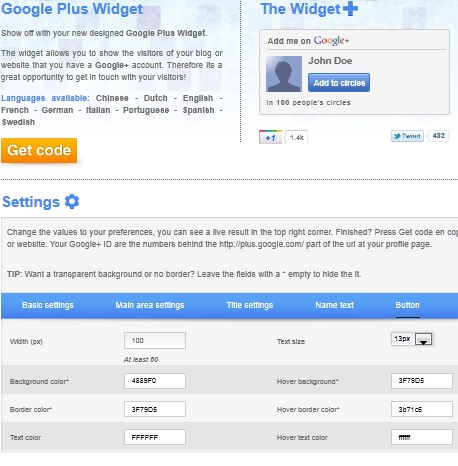
Step 4 : After completing the settings , click the “Get Code” button. You will be able to see the widget preview and the code also will be presented. You can copy the code. The preview will be similar to the below,
Step 5 : If you are using self hosted WordPress, then you can add a new widget to the sidebar and paste the code. If you have other blogging platforms or website then you can paste the code using appropriate mechanisms. If you know how to edit your template files, then you can use the widget where ever you want.
Check Statistics
According to the Google Plus Widget provider, once the code is installed on your blog you after 48 hours you can access the statistics. This includes graphs for your follower count and widget views.


Before you go, subscribe to get latest technology articles right in your mailbox!.