Google has introduced Priority Inbox in Gmail to manage your emails better. It is a very unique feature and can save you from finding your important mails efficiently.
Priority Inbox can help save you time if you’re getting large number emails everyday and will monitors your messages and tries to organize your inbox messages based on many different criteria, like the frequency of message correspondence with a particular sender. The Priority Inbox feature automatically identify your important incoming messages and separates them out from everything else.
Let us discuss how best we can use the Priority Inbox.
What is Priority Inbox?
If priority Inbox is enabled for you, then you will see a new link near Lab and settings links on the right-hand side of your mail window. You can enable it.See the image below.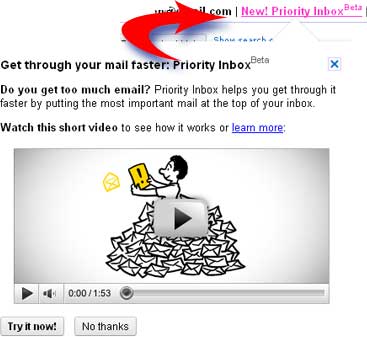
Priority Inbox helps you to prioritize your email messages based on the configured filters and provides a Priority Inbox for your important mails. You still have the default Inbox.When you click the Priority Inbox link on the left-hand side of your mail window, your messages will be grouped in three sections: Important and unread, Starred, and All other mails
You can also search for messages that are important by using the search operator “is:important“.
Show or Hide Priority Inbox
If you decide not to use Priority Inbox you can hide it easily. Go to,
Setting –> Priority Inbox tab –> Choose Do not show Priority Inbox and click on Save Changes.
Using filters with Priority Inbox
You can use filters in Gmail to always or never mark a certain type of message as important. Create a new filter and select the option “Always mark it as important” or “Never mark it as important” to mark it as important or to discard. Create custom importance filters for different types of messages from different sources.See the screen-shot below.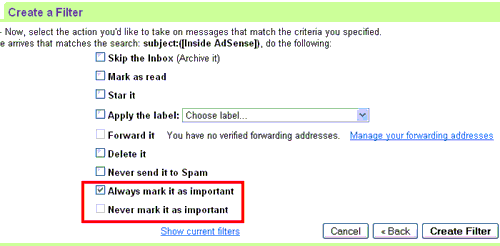
Configure Priority Inbox to show important achived messages by filters
Automatically archived mails with filters will not appear in your inbox,but to make it appear in Priority Inbox you can do the following
- Click Settings –> Select the Priority Inbox tab.
- In the Filtered mail section, choose Override filters.
- Click Save Changes.
Importance markers in Priority Inbox and Layout.
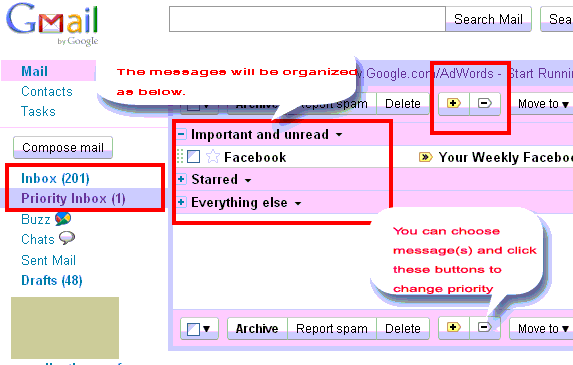
In Gmail window itself you can select messages to set or reset priority. Also both the inboxes are available on the left-hand side. When you click the Priority Inbox link on the left-hand side of your mail window, your messages will be grouped in three sections: Important and unread, Starred, and Everything else.See below.
Read more about the Priority Inbox at Gmail Blog. Email overload? Try Priority Inbox – Official Gmail Blog
The feature definitely helps people who uses Gmail extensively and of course millions of people are using Gmail as their primary E-Mail application.

This is really a good feature addition from Google
But will it impact performance of Gmail?
Don't think So ,because prioritizing email will be a background process
Hi Delene,
Thanks for visiting globinch. Many thanks for your comments.