PDF Optical Character Recognition – OCR – Tools
PDF documents or Portable Document Format (PDF) is a file format created by Adobe Systems.PDF file encapsulates a complete description of a fixed-layout 2D document that includes text, fonts, images, and 2D vector graphics.
PDF files can be generated broadly by two different mechanisms.Normally the computer generated PDF documents consists of characters that have an electronic character designation.This can be easily readable and editable.Usually to convert printed materials or handwritten books into electronic format requires scanning the document and save as PDF document.
This document created through scanning the printed documents is an image PDF.It is just an image.PDF OCR tools used to convert a scanned document into an editable format.These tools achieve this through optical character recognition technology.This is a complex process.OCR software is required to analyze the scanned image of each character and match it to an electronic character-based file.In fact the tool extract text from an image and convert into editable format.
PDF OCR TOOLS – OPTICAL CHARACTER RECOGNITION TOOLS
Tesseract OCR
Tesseract OCR is a commercial quality OCR engine originally developed at HP between 1985 and 1995.This is migrated to Google code and is probably one of the most accurate open source OCR engines available.This can read a binary, Grey or color image and output text. The inbuilt tiff reader will read uncompressed TIFF images and libtiff can be added to read compressed images.
Download
GOCR – JOCR
This is a good OCR tool developed under the GNU Public License.It converts scanned images of text back to text files.It can open many different image formats, and its quality have been improving in a daily basis.
Download GOCR from here.
The windows front end of GOCR can be downloaded from BrotherSoft.
OCR Desktop
OCR Desktop Application is a desktop utility that generates ASCII text from images such as a bitmap or image file.The utility is free for personal use, the registered version turns off pop-ups and advertising.The following image is taken from OCRTools.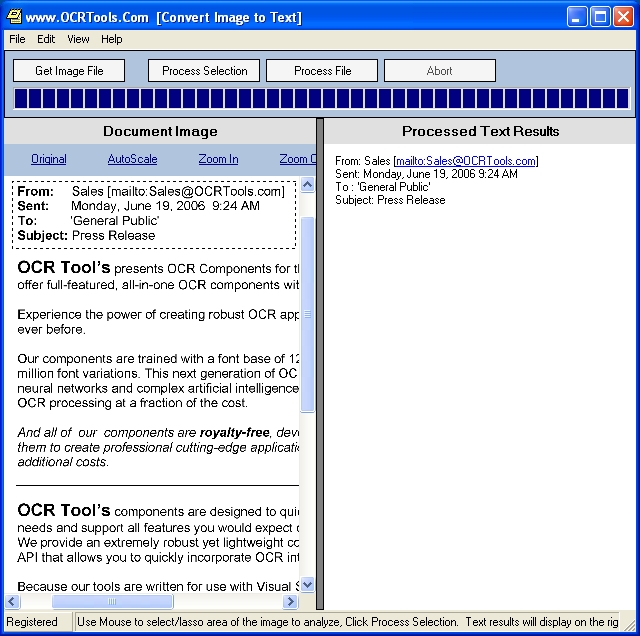
Download OCR Desktop from here.
SimpleOCR
SimpleOCR is another optical character recognition tool.SimpleOCR Freeware Application.It is useful for those who just need to convert a few pages to text or MS Word to avoid retyping.
Download from here.
Free-OCR.com
Free-OCR.com is a free online OCR tool that can extract text from any image you supply.You can upload your image files and it accepts JPG, GIF, TIFF BMP or PDF files.It process only first page of PDF files and the images must not be larger than 2MB.You can access the online service here.
Free OCR
Free OCR is a complete scanner and optical character recognition (OCR) program. It includes a Windows installer and It is very simple to use and supports opening multi-page tiff’s, Adobe PDF and fax documents as well as most image types.FreeOCR is freeware and the included Tesseract free ocr engine is distributed under the Apache V2.0 license.

Many many Thanks for the complete info !
Many thanks for useful info!
Good review.
-SA
Has anyone tried http://www.ipdf.us ? By looking at their sample, it seems working reasonable good considering the original PDF quality… Share your experience please.