

Data stored in a USB drive is always prone to unauthorised access and theft. It is very important to make sure that you take necessary steps to protect sensitive information stored on a USB Flash memory disk. There are many methods to protect a USB drive and data, and many levels of protection can be applied. You can password protect the entire disk or encrypt the information stored on a USB drive and even encrypt, hide partitions of the disks.
As we discussed in our earlier article USB data protection helps not only from data theft but also make the information inaccessible to unauthorized processes, such as processes executed by virus or any malware.
Best Free Tools to Protect USB Drive
FreeOTFE on-the-fly disk Encryption Program
FreeOTFE is an open source on-the-fly disk encryption (OTFE) computer program. FreeOTFE is available for Microsoft Windows and Windows Mobile devices. As the name indicates FreeOTFE creates a virtual drive on your PC/PDA to which any data written is automatically encrypted before being stored on USB drive or disk. FreeOTFE can be used in “portable mode”, which allows it to be kept on a USB drive or other portable media, together with its encrypted data, and carried around. This will make sure that FreeOTFE volumes can be accessed without installing any software, and also on PCs where no administrator rights are available.
Rohos Mini Drive
Rohos Mini Drive free edition creates hidden and encrypted partition on the USB flash drive memory. You can protect the data by a password and strong encryption with the tool. Automatic on-the-fly encryption uses AES 256 bit key length and NIST compliant encryption standards. Portable version allows working with encrypted USB drive partition on any PC.  The Free edition supports maximum 2 GB encryption size. It also has a secured virtual keyboard that protect encrypted disk password from a key logger. The “File Virtualization” helps in preventing secret data leak outside encrypted disk such as temp folders.
USB Safeguard
USB Safeguard free version works only with USB Flash drive of size max 2 GB and supports for Windows XP/Vista/7/8. You need to download and copy the file “usbsafeguard.exe” on the root of the pen drive and start it. 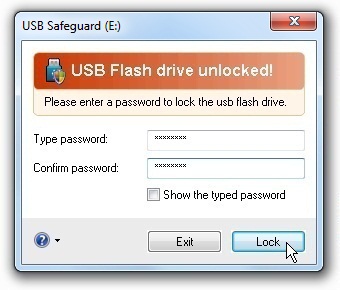 When you start it the first time, a message will appear asking you to initialize the pen drive and then set password and press Lock button to lock the pen drive and protect files stored in it. Please note that during initialisation the tool will erase data from drive, so keep a backup first before initialisation. To unlock, launch the program from the pen drive and use the password and press Unlock button.


Before you go, subscribe to get latest technology articles right in your mailbox!.