Write your own Twitter widget in (Recent Tweets) 3 steps using twitter API.
There are many of twitter widgets available that are ready to use and free. But the problem with all these widgets are that you cannot change it’s look and feel as the way you want.So better let us create our own widget so that we can use that for our purpose.
Read: 5 best and useful twitter applications.
Write your own Recent Tweets Twitter widget Using twitter API.
We are going to create a very simple widget that displays the recent tweets.The widget just displays the most recent 10 tweets of your twitter account.This is a basic widget.We will discuss building more complex twitter widgets in the future tutorials.
You can change the number of tweets here by changing the count value.
The tweets will be displayed inside a “div” element. You can apply styles to this div by changing the CSS script given in step 3.
Step 1: Create a place holder
First we need to create a “div” and place it in your web page where you want the widget to appear.
1 2 | <div id="#twitter_update_list"> </div> |
The id of the dive denotes the CSS style ID.That is explained in Step 3.
Step 2: Create a Script to retrieve reent tweets
Now we need to script which actually uses the Twitter API to get the recent tweets.The code is given below. You just need to copy and paste the below code just below the code given above (Step 1).You can place anywhere on the page. Better keep it at the very end of your page, before . This will helps the rest of your page to load first.
1 2 3 4 | <script type="text/javascript" src="http://twitter.com/javascripts/blogger.js"> </script> <script type="text/javascript" src="http://twitter.com/statuses/user_timeline/globinch.json?callback=twitterCallback2&count=10"> </script> |
You need to replace the “globinch” with your own twitter user name.You will only be able to access the latest 3200 statuses from a user’s timeline due to pagination limits.In the above code we are getting the recent 10 tweets (count=10).You can change this as you wish.
Step 3: Beautify the widget
Now let us beautify the widget. If you know how to write css style scripts you can. If not just copy paste the below code to your CSS style file. If you don’t have one just add the below code in your web pages between tags.
1 2 3 4 5 6 7 8 9 10 11 12 13 14 15 16 17 18 19 20 21 22 23 24 25 26 27 28 29 30 31 32 33 34 35 36 37 | <style>
#twitter_update_list{
display:block;
margin: 0 auto;
width: 670px;
background:#D3D3D3;
border: solid #0000FF;
border-width: 2px 2px 2px 2px;
padding:5px;
display: block;
height: 200px;
font-style:bold;
}
#twitter_update_list li {
list-style-type: none;
}
#twitter_update_list span a
{
display: inline;
color: #008080;
}
#twitter_update_list span a:hover
{
text-decoration: underline;
color: #66CCFF;
}
#twitter_update_list span
{
color: #333;
font-family:Arial, Helvetica, sans-serif;
font-size:10px;
font-weight: bold;
color: #7d716d;
margin: 0;
padding: 0px 0 0;
}
</style> |
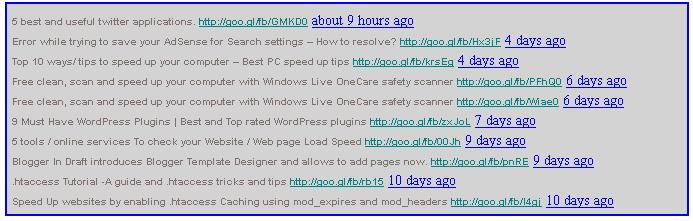
Done! The above widget will appear as below.
-
RS
-
http://www.lavertyarchitecture.co.uk Munt
-
-
http://widgetropolis.com/tools/twitter/twitterFollowers.cfm Antone Dockstader
-
http://www.sphereofhiphop.com/rap/2010/09/motion-plus-fallen-angel-video Lilian Coontz
Join Globinch on Social Media
Follow Globinch
Popular Posts
- Turn your Windows 7 Computer Into a Personal Wi-Fi Hotspot 20 comment(s) | 26,492 view(s)
- Search Engines for File Sharing Sites : Rapidshare Search, Megaupload and More 2 comment(s) | 18,457 view(s)
- Google Translate Now supports Bengali, Gujarati, Kannada, Tamil and Telugu 2 comment(s) | 17,346 view(s)
- Best PDF OCR Tools to Convert Scanned images to Text / Word Documents 4 comment(s) | 13,642 view(s)
- Google Top Searches Today – Hot Google Search Words today 8 comment(s) | 13,504 view(s)
- Globinch Search 0 comment(s) | 10,389 view(s)
- Access Blocked sites, Unblock Restricted Websites 16 comment(s) | 9,453 view(s)
- Password Revealer – How To Reveal- Show Password Behind Asterisks? 1 comment(s) | 8,517 view(s)
- Play Angry Birds Game Free and Offline in Chrome Browser 1 comment(s) | 8,244 view(s)
- Free Online OCR Software to Convert Images Into Searchable PDF, Doc, HTML or Text 2 comment(s) | 8,083 view(s)
Recent Articles
- How to Use Wi-Fi the Secure Way
- 5 Apps to Boost Android Performance
- Building a Smarter Site Using a WordPress Platform
- Samsung Galaxy S IV Smartphone :Summary of All the Radical Innovations
- 5 Killer Tips to Increase Traffic to Your Blog
- Domain Parking to Make Genuine Money Online
- SEO Is Not Dead, But You Need to Upgrade The Process
- A Complete SEO Guide on Using Social Media for Better SERPs
- When Should You Use Geotargeting or Setting Geographic Target in Google Webmaster Tools?
- How To Optimize Your Google+ Page And Profile For Search Engines