
Are you looking for a new job? Do you update your Resume frequently on job sites like Monster.com? Then you may find Monster Easy Submit Add-in for Microsoft Word helpful. Monster Easy Submit Add-in for Microsoft Word helps you to upload your resume to Moster.com directly from Word itself.
In one of our earlier discussion we saw the Google Cloud Connect to share, save documents to Google Docs directly from Microsoft Office programs.
Monster.com is one of the largest employment websites in the world and is one of the 20 most visited websites out of 100 million worldwide. It is also the largest job search engine in the world.
Monster Resume Easy Submit Add-in for Word is an application that allows job seekers to upload resumes to Monster.com quickly and easily without leaving Word. Using the Monster Easy Submit you can easily apply for job by finding better matches for your job.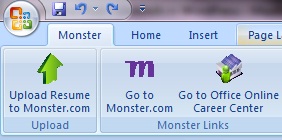 The Monster Easy Submit functionality is available through Word 2007 templates and if the template is saved from non-secure setting in your machine, you may need to enable Macros Security Setting. See below.
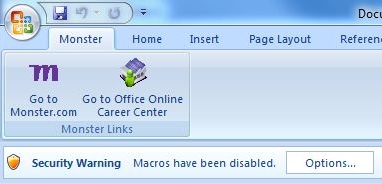 To enable the macros you need to click the Options as seen above, then choose Enable this content, and click OK.
Also you need Microsoft .Net Framework 3.5 SP1 installed in your machine as well as you should have administrative privileges to use the Monster Easy Submit Add-in. Once installed you will see “Upload Resume to Monster.com” button on the ribbon menu. After installation, it will always be available in the Add-ins tab in Word for future resume uploads to Monster.com.
You can edit or update your Resume from Word and directly upload the file to monster.com. When you click “Upload Resume” button the add-in will ask your credentials. You need to login to monster.com to upload the resume. The Monster.com Taskpane should show up on the right side of the document. Type in your Monster login credentials or click the “Become a member” link to create an account on Monster.com for the first time.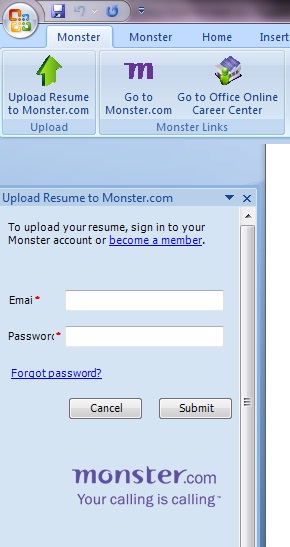 As you may be aware you can save up to five resumes to your Monster account. After five resumes, new uploads via Easy Submit will require that you delete an older resume and overwrite it with the new one.
Get Monster Easy Submit Add-in



Before you go, subscribe to get latest technology articles right in your mailbox!.