
Losing your iPhone or iPad can be a painful and frustrating experience and is same for almost all the people who own these gadgets. Not only you lose your favourite gadget but also the most valuable data stored in it. In many cases the most frustrating part of losing your iPad is, the person who found never returns it to the owner.
iPad or other laptop theft is growing day by day. According to Wikipedia “The incidence of laptop theft has been growing at a steady rate as laptop use continues to grow, and more than 1 in 10 laptops will be stolen within their lifetime.”
So if you own an iPhone or iPad, you can set up ‘Find My iPhone/iPad‘ using your Apple ID and password and MobileMe account to make sure that you can locate your iPhone or iPad or at least you can try to get it back by knowing its location.
- Read Related article: Track Lost And Stolen Laptop Using Prey For Free
‘Find My iPhone and/or iPad‘ is a free to set-up.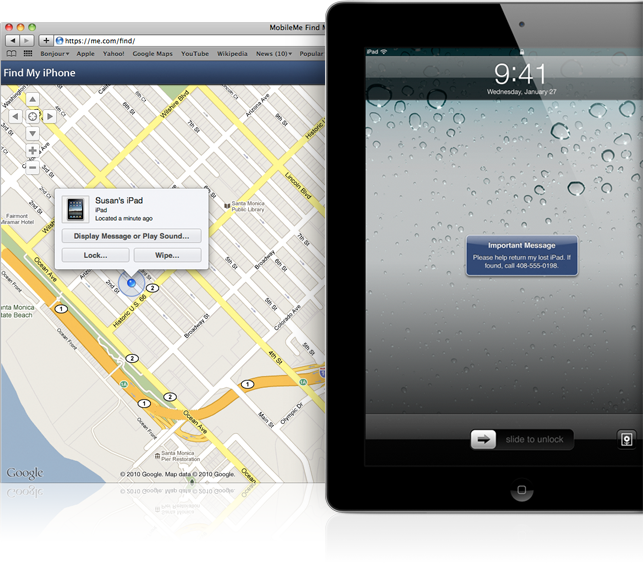
Image courtesy apple.com
You can create a free Find My iPhone/iPad account on any iPhone 4, iPad, or iPod touch (4th generation) running iOS 4.2 or later. Once you create an account on a qualifying device, use your Apple ID and password to enable Find My iPhone on your other devices running iOS 4.2 or later.
After setting up the Find my iPad or iPhone you can check it by signing into me.com from a computer to see your iPhone or iPad on a map, display a message, or set a passcode lock. One thing to note here is that the feature and application “Find My iPhone/iPad” is not available in all countries.
Follow the below links to set-up Find My iPhone and iPad before it is too late. You can find the detailed step by step instructions to set-up the application in the below locations.
- Find My iPhone Setup
- Find My iPad Setup


Before you go, subscribe to get latest technology articles right in your mailbox!.
Nice post.
Diaz Samera,
Thanks for visiting and your comments