
Sometimes it is necessary to create new wordpress page templates using wordpress custom field for specific purposes like a search results page. If you want your page to be totally unique, you can add different style elements to it.
So whenever you want to create a new page in wordpress admin page, just select your unique template that suites your need. It is easy to create a custom page template in wordpress. Most of the pages in this blogs are created using custom page templates. For example the Thumbnail Based Post Archives page is based on a custom page template.
Create custom WordPress page template
To create a custom page template , you need a text editor and an FTP tool like FileZilla. Open a new file and add the following as the first element in the page.
1 2 3 4 5 | <?php /* Template Name: globinch_ */ ?> |
See I have given the template name as “globinch_” . Also the above code should be the first thing in the page. After that you ca add anything you want to display on the page. For example you should require the header elements , the body elements, sidebars and footer etc. Normally the layout looks something similar to the below code block.
1 2 3 4 | <?php get_header(); ?> <!-- #content --> <?php get_sidebar(); ?> <?php get_footer(); ?> |
Upload custom page template to your server
Once your page is ready you need to upload the template to the server. Using the FTP tool upload it to your themes folder. The destination themes folder should be some thing similar to “/httpdocs/wp-content/themes/<Your-Theme>”
Create a new page using custom page template
After uploading the custom page template successfully you can start using it to create new pages. In the wordpress admin Dashboard, click on “Add New” under the left side “Pages” menu. Under the “Page Attributes” choose the newly created template. See the screen-sot below.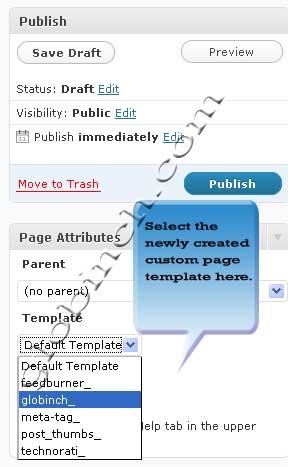


Before you go, subscribe to get latest technology articles right in your mailbox!.