Multi language translation services like Google translation helps you to achieve translation, for example say English to french translation or English to Hindi translation etc online.
How to translate and convert doc, pdf, txt, html or rtf documents into another language or simply convert some text in one language into a different language? Free language translator application is a desktop language translator application which uses the Google translation service to translate from one language to another.
You can easily translate from and to many languages like French to English translation or English to Hindi Translation etc.This Free language translator and file converter is a free windows application which require Microsoft .NET Framework 3.5 Service Pack 1 or higher to run.
It is very easy to translate your document or text from one language to another. The tool also check accuracy of translation. You can view the accuracy level by cross checking the translated versions translation in original language.
Translate documents using the Free language translator in few simple steps.
- Download and install Free language translator
- Open a doc, pdf, txt, html or rtf document, or drag a text document from explorer, or just paste some text in first panel.
- Select the “To” and “From” languages
- Click on the “Translate” and select one of the options from the menu. See below.
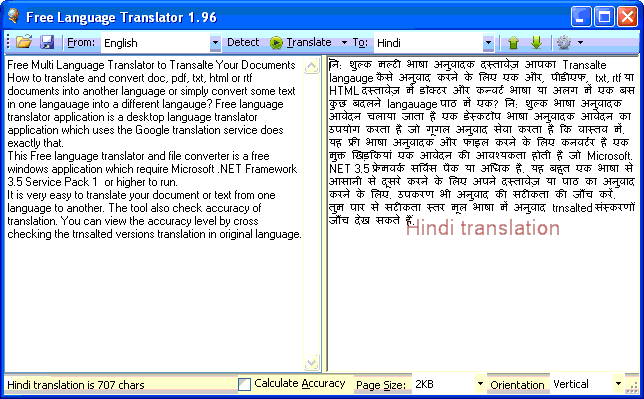
- Save the translated text or file or you can copy the translated text from the second panel.
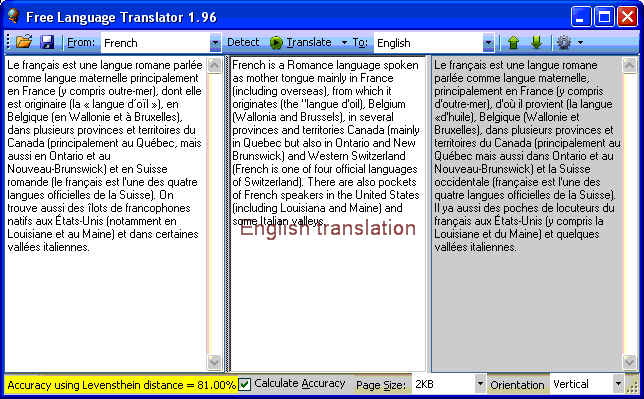
- You can check the accuracy by selecting the “Calculate Accuracy” check box and then do the translation again. See below the translation from French to English. It shows the accuracy level of 81.0%. You can cross check the with the original text in panel 3.
As mentioned in the tools web page please note this important information. “Note that if you translate secret or confidential content, the original and translated text flows unencrypted over the Internet and Google can potentially inspect and/or store it.”
System requirements
Free language translator and file converter requires Microsoft .NET Framework 3.5 Service Pack 1 or higher instlled in your windows to work.
Download the Free language translator.
