
Blog authors who uses Blogger platform to blog always waited for this interesting news.Blogger has released Blogger Template Designer on Blogger in draft ,using which you can customize the look and layout of your blog.
Blogger in draft is a special version of Blogger where Blogger try and releases new features everyone.
Another very useful feature Google blogger introduced is the ‘Pages‘ on Blogger in Draft.
- Blogger blogs- 3 methods to post to your blog from GMail and iGoogle.
- 10 steps to link AdSense and Analytics accounts – Using AdSense Analytics Code (ASAC)
- Blogger Scheduled Posts-How to Schedule the Blogger posts.
How can I Use Blogger in Draft to access these features?
To utilize the Blogger in draft features, just go to http://draft.blogger.com/ and log in. To go back to the ‘normal’ Blogger, log in to http://www.blogger.com/.
The Blogger Template Designer helps you to design your page even if you do not know CSS or HTML.This designer has around 15 templates to choose from and each one has one ,two or three column layouts.Along with all these you can configure fonts and select images from a huge collection of images. Blogger template designer allows you to just select new template and make your own template with your favorite colors and images.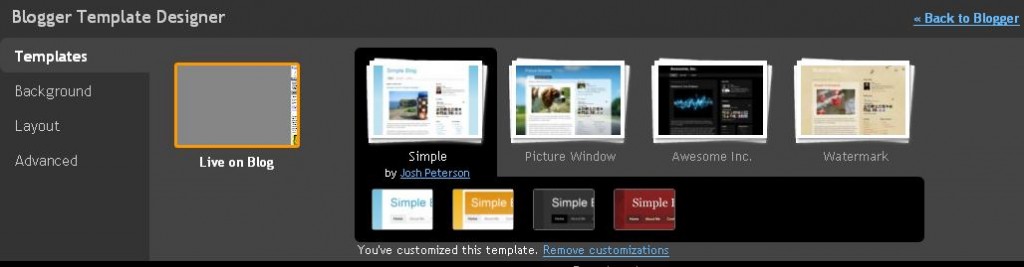
To access Blogger Template Designer click on your blog’s ‘Layout‘ link to go to the Layout tab. The link to the Template Designer is at the end of the sub-menus.
Please note that as mentioned in the Blogger Draft blog “the Blogger Template Designer is not supported on Internet Explorer 6,nor, for that matter, are the new templates”
Another very useful feature Google blogger introduced is the ‘Pages’ on Blogger in Draft.Earlier blog authors who uses Blogger used to create posts to act as pages,since the feature was not available on blogger. This helps to help you publish static information on stand-alone pages. You can now create a page similar to a blog post.You can , and up to 10 pages from your blog.The published page can be linked to those from the new Pages widget, that lets you add links to your pages as tabs at the top of your blog.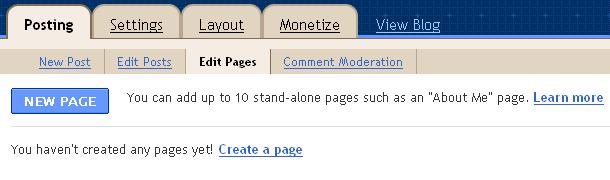 To access the feature click on your blog’s ‘Posting’ link and then the ‘Edit Pages’ Link. There You can create or edit pages and add up to 10 stand-alone pages such as an “About ” page.


Before you go, subscribe to get latest technology articles right in your mailbox!.
Thanks a lot for this article write-up.Truly thank you! Awesome.