
Twitter recently started t.co URL shortener service to improve safety and to use as a quality signal for its resonance algorithm.
Recently you might have encountered a warning about malware or spam when you try to Tweet a particular link or visit a particular link through Twitter‘s link service. Thanks to the new link service, Twitter t.co url shortener, which flags harmful sites, phishing sites, sites that download malicious software onto your computer, or spam sites.
As a result of this when you try to tweet a particular link that belongs to a flagged site or add such a link to your profile or visit similar link through Twitter’s link service, http://t.co you will get a warning message similar to the below image.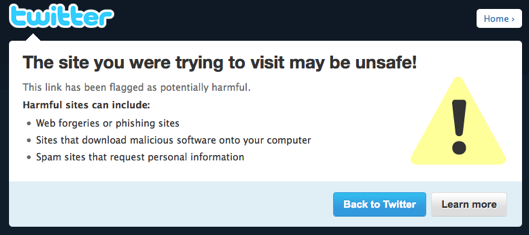
Twitter t.co URL Shortening Service and its impacts
The new service will have major impacts on how each tweet will be treated in Twitter world. It helps to determine safety by flagging dangerous links and it impacts the popularity and importance of each tweet based on t.co link analysis.
The new URL shortening service from Twitter as it says is only used on links posted on Twitter and is not available as a general shortening service like bit.ly or goo.gl. All links including links shared on Twitter.com, links included in Direct Message notification emails etc will pass through new link service and are converted to a http://t.co link.
All these links which are converted by Twitter’s link service is checked against a list of potentially dangerous sites. If there is a match then user will get a warning message.
Apart from the security benefits the new service will help you in posting a link that is very long without using another link shortening service. You can paste a link of any length into the Tweet box on Twitter.com and it will be shortened to 19 characters using the new t.co service.
Also as we mentioned the t.co link analytic (how many times a link has been clicked etc.) will be used as an important quality signal for its resonance algorithm. So the t.co statistics will determines how relevant and interesting each Tweet is when compared to similar Tweets.
What if Twitter Flag Your site as Spam or Malware?
That will definitely be a nightmare. But you need to take immediate actions to resolve these issues. As we mentioned in the below mentioned post, first you need to confirm malware infection and the you need to clean up your site.
Related:
- How to Check a Website for Malware and Virus Infection
- How to Clean Up Website From Malware Infection
You can confirm malware infection by using Google’s URL diagnostic tool. Most of the major search engines bots search for malware on every websites and will block the content from search results once they detect any malware.
Once cleaned up you need to submit the site for reconsideration to search engines. Similarly you need to submit the site to Twitter Trust & Safety team.
Read more about Twitter t.co url shortener


Before you go, subscribe to get latest technology articles right in your mailbox!.