
How to use Twitter in Outlook (using Microsoft Outlook twitter add-in) ? This twitter for outlook add-on “TwInbox” is a twitter client for outlook that makes your tweet life really easy and efficient. Twitter and Outlook can be glued together using this twitter for outlook add-in.
You don’t have to login to twitter every time you want to tweet. You can tweet directly from the Microsoft Outlook. TwInbox twitter add-in supports Outlook 2003, Outlook 2007 and Outlook 2010 with the latest Service Pack.
TwInbox Twitter Add-in for Microsoft Outlook is a fully-featured, powerful Twitter client at your fingertips without having to open any other applications other than Microsoft ® Outlook ®. This is particularly useful for you, if you use Microsoft ® Outlook ® and a regular twitter user.
Using TwInbox you can update your Twitter status directly from Outlook and also receive your friend updates in Outlook. One of the most interesting feature of this add-in is that you can archive, manage, group and search your tweets the same way you manage your email and also you can use Outlook’s “Reply” and “ReplyAll” commands to send twitter direct messages and replies.
The add-in provides bit.ly URL Shortner service to post long URLs. TwInbox also allows you to manage multiple Twitter accounts that can be managed in multiple folders.
How to : Microsoft Outlook Twitter Add-in TwInbox
- Download and install TwInbox.
- You will see a new TwInbox toolbar at the top of your Outlook window after Outlook restart.
- Click Options on the TwInbox drop-down and add a Twitter account. See below.
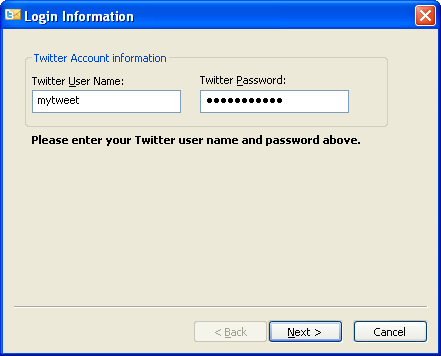
- Create and select a new Outlook folder for new Twitter messages.
- Click on “Check for new tweets now”.
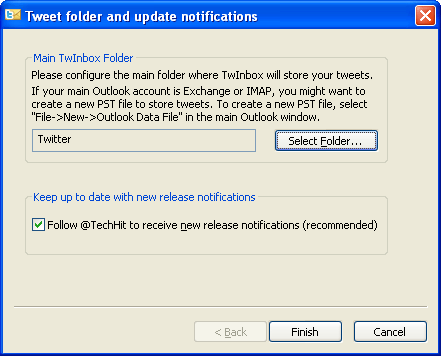
- TwInbox downloads all tweets to your Outlook folder.
- You can tweet diectly now and also you can select recipient by searching your friends list.
The tool automatically sort new tweets into per-sender folders.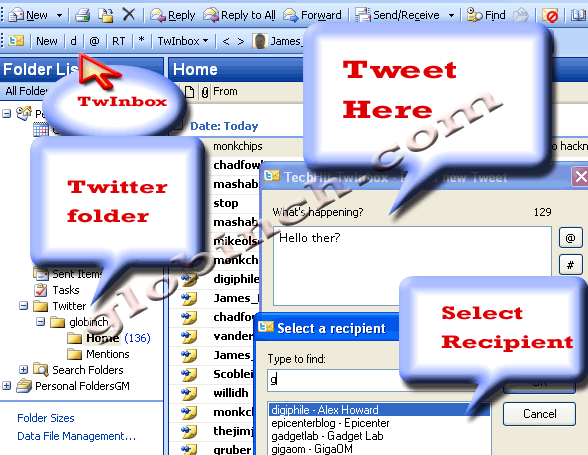 There are any other features available with TwInbox like upload and post picture files and Outlook email attachments.
TwInbox System Requirements
- Microsoft® Windows® XP
- Windows Vista®
- Windows 7 with the latest Service Pack.
- Outlook 2003
- Outlook 2007
- Outlook 2010 with the latest Service Pack


Before you go, subscribe to get latest technology articles right in your mailbox!.