
If you are using Windows 7 or Windows Vista then you can use the included screen-capture Snipping Tool. Snipping Tool screen-capture tool allows you to take screenshots (snips) of an open window, rectangular areas, a free-form area or the full screen. We already discussed many screen-capture tools as mentioned below in the related posts. But the Snipping Tools is included as an OS tool.
These Snips can then be annotated and saved as an image file (PNG, GIF, or JPEG file) or an HTML page. There is also an option to email the image.
Related:
- Free Screencast or Screen Capture and Screen Recorder software
- Best Screen Crop Tool and Screen Capture Utility.
- Browser Screenhots : Take screenshots of selected area in browser
- Awesome Screenshot: Capture & Annotate

When you capture a snip, it is automatically copied to the Clipboard. This will be available for you and you can paste it into a document, email, or a presentation. Also the the captured area of the screen appears in the mark-up window, where you can write or draw on it, save it, and send it to someone in email.
Snipping Tool captures a screen-shot of,
- The whole window
- A rectangular section of the screen
- A picture or a section of webpage
- Draw a freehand outline with your mouse or tablet pen and capture it.
When you capture a snip from a browser window and save it as an HTML file a URL appears along with the image. To disable this feature you can o to options and deselect the “Include URL below snips” check box. see options below,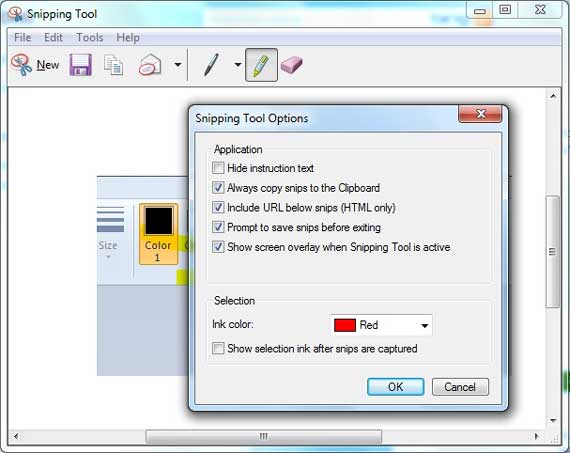
You can also use Pen, Highlighter or eraser to annotate the image. See below.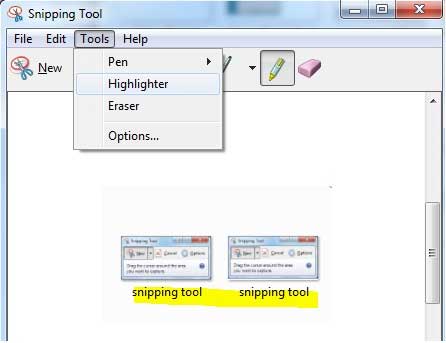
Snipping Tool is available with,
- Windows 7 Home Premium, Professional, Ultimate, and Enterprise editions.
- Windows Vista


Before you go, subscribe to get latest technology articles right in your mailbox!.