
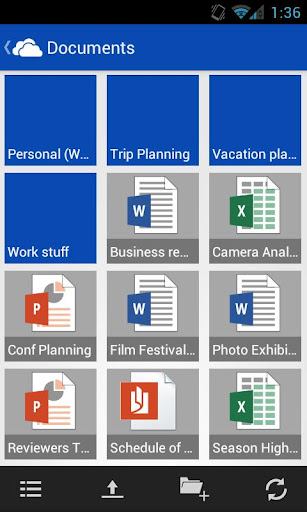
Microsoft android skydrive app now enable android device users to manage and sahre SkyDrive files from their Android smart phone. Windows SkyDrive from Microsoft is one of the popular online file storage and sharing service that provide good storage capacity free of cost. For new users the free storage limit is 7GB. Files up to 300 MB can be uploaded via drag and drop into the web browser, or up to 2 GB via the SkyDrive desktop application for Windows and Mac OS X.
SkyDrive allows users to upload, create, edit, and share Microsoft Office documents such as Word, Excel, PowerPoint and OneNote documents within the Web browser. SkyDrive integrates with social networks such as Facebook, Twitter and LinkedIn to enable users to quickly share their files with their contacts on these social network.
You can use latest version of Microsoft Office to simultaneously edit the same section of documents stored on SkyDrive. You can also download an entire folder as a zip file.
Related Articles:
- Microsoft Windows Live Mesh : Sync, Share, Remote Connection and More
- Microsoft Docs to Create, Share Office Documents With Your Facebook Friends
Microsoft SkyDrive for Android
 Now Microsoft has released the official SkyDrive app for Android phones. The android app is available for download from Google Play. The app is supported on Android 2.3 and up. You can create/view folders inside your drive and upload photos or videos from your phone to SkyDrive using SkyDrive for Android.
Following features are available in SkyDrive Android application.
- You can access all of your SkyDrive content including files shared with you and view recently used documents.
- You can also choose to upload multiple photos or videos from your phone to SkyDrive.
- The ap allows you to share your files and photos. You can also send a link in email or in another app.
- As we mentioned above you can easily manage your files(delete, or create new folders) using the app.
Get SkyDrive for Android from Google Play.


Before you go, subscribe to get latest technology articles right in your mailbox!.