
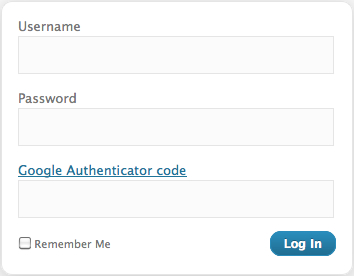
How Secure is your WordPress Blog from unauthorised access? Secure WordPress Login process is an important step in securing your WordPress Blog.
Two factor authentications is a powerful mechanism to protect your online account. Google introduced Two-Factor Authentication long back and many online services are following the path. Two-Factor Authentication makes sure to a great extent that your accounts don’t get hacked. Google has introduced 2-step verification process for Google Apps initially. Now many prominent services such as DropBox, Facebook, Yahoo Mail, DreamHost etc started offering Two-Factor Authentication security.
If you have enabled two factor authentications, after you enter your username and password and if they are accurate, you’ll get a secret code sent to your phone, and only after you enter it will you get into your account.
But in extreme cases SMS password methods are also vulnerable to man-in-the-middle attacks such as mobile number porting attacks. In mobile number porting attacks an attacker tricks a mobile provider into transferring a victim’s mobile number to a new account which is under the attacker’s control. Any Text SMS messages to the victim’s mobile number will instead be directed to the attacker.
Related WordPress Security Articles:
- Must Do Tips to Secure WordPress Blog and Site
- Secure WordPress Blog- How to Change WordPress Admin Username?
- Top 5 WordPress File Change Monitor Plugins
- 60+ Most Useful WordPress Tips, Tricks, Tutorial
Secure WordPress Blog Using Two-Factor Authentication
If you maintain a self hosted WordPress Blog you can also secure your blog from unauthorised admin access using 2 factor authentications. (WordPress.com already supports Text Messaging feature but currently available in the USA only).
The Google Authenticator plugin for WordPress gives you two-factor authentication using the Google Authenticator app for Android, iOS, and BlackBerry. Using this plugin the two-factor authentication can be enabled per user basis. It is always better to use this for administrator account. You may not require this to be enabled for account such as contributor etc.
After activating the plugin you need to scan the generated QR code with your phone or enter the secret manually and press the update profile button. Next time when you try to login to the WordPress admin console, you need to provide the verification code received on your mobile phone to complete the login process.


Before you go, subscribe to get latest technology articles right in your mailbox!.