
The widespread popularity of social media services also introduced new types of threats. Social media services like Twitter can be used to send spam messages, spam links or it can even be used to attempt high jacking. As Twitter itself says “People are not always who they claim to be on their Twitter profile “.
You can avoid these security problems by following certain steps and by using some really useful free applications and services. Twitter also provides you various mechanisms to avoid e-threats. A tool like Bitdefender Safego which is mentioned below is really useful in protecting your Twitter account.
Avoid Sharing Personal Information or set your Tweets to protected
First of all avoid sharing personal information like credit card number, telephone number, private addresses or location etc. through Twitter. Always remember that your Tweet is public and can be seen by anyone. You can set your Tweets to protect so that your Tweets will only be available to approved followers. Also once you set your Twitter account protected then people will have to request to follow you and each follow request will need your approval. You can protect your Tweets in your account settings page.
Block those people who sends unwanted communications
You can also block people who send unwanted communications. You can unfollow people who you really want to ignore. Blocking prevents the user from following you or replying to you. If someone has posted your private, personally identifiable information on Twitter you can submit a support ticket on Twitter.
Use Tools like Bitdefender Safego to protect your Twitter account for Spam, Scam and dangerous links
Bitdefender Safego is a nice free application from Bitdefender, which can be used to protect your Twitter account. You need to authorise this application to access your Twitter account information like Tweets, followers etc. It helps you to keep your Twitter account safe by,
- checking unknown users before you follow them
- checking the accounts you are following
- scanning your direct messages for spam, suspicious links or highjacking attempts.
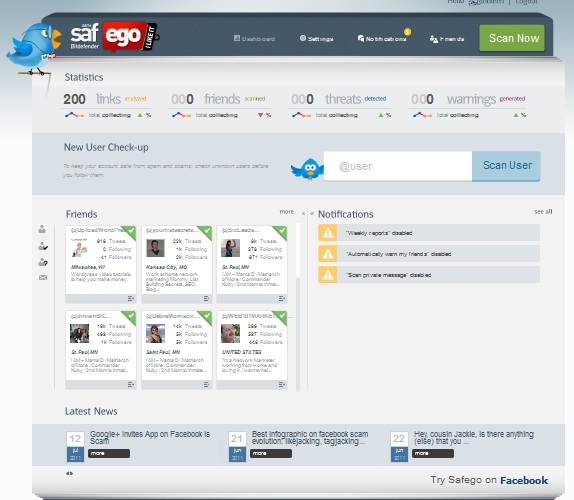
The Safego uses the Bitdefender antimalware and antiphishing engines to scan URLs in the cloud. Safego uses colour codes to indicate the threat level, where red indicates highly suspicious accounts, yellow indicates moderate threats, Grey low threats and Green indicates no threat.
If Bitdefender Safego finds a Twitter account as a suspicious by scanning real-time, it will add an unfollow button on the application dashboard. Safego scans the Twitter account in the background, and if it finds some threat it will notify you by means of a direct message. To do this you need to follow Safego on Twitter.
You can also enable to send direct message from your account to those persons on your Follow list in whose accounts Safego has detected some issues.
Try Bitdefender Safego


Before you go, subscribe to get latest technology articles right in your mailbox!.