
 Your AdSense publisher ID is the most valuable asset you can have, if you area Google AdSense publisher. Google is very particular about the type of content that you display on any web page that uses Google Adsense Advertisements. Inappropriate content that violates Google AdSense Terms and conditions can kill your AdSense ambitions. If Google bans your Adsense account that will most probably a lifetime ban.
Read more about Top 7 Must-Know Tips to Avoid Google Adsense Account Termination
If you use Google Adsense then you should be careful about the usage of you publisher id or the AdSense ads. If some one uses the publisher id or Adsense ads that carry your publisher id in other website, that has inappropriate content then there are chances that Google can penalize you for that. That could be a lifetime termination of your Adsense account.
How do you Prevent misuse of your AdSense publisher ID
Google provides all possible mechanisms to protect its AdSense publishers from misuse of your AdSense publisher ID. You can easily provide Google the list of websites or pages that will display Adsense Ads with your AdSense publisher ID. This is very simple. Follow the steps below.
- Log in to your Adsense Account
- Go to Adsense Setup Tab then Allowed Sites
- List your allowed sites in the text area provided
- Click on Save changes.
As mentioned on that page, “If you put your ad code on a page not on this list, ads will still show, but impressions and clicks will not be recorded.”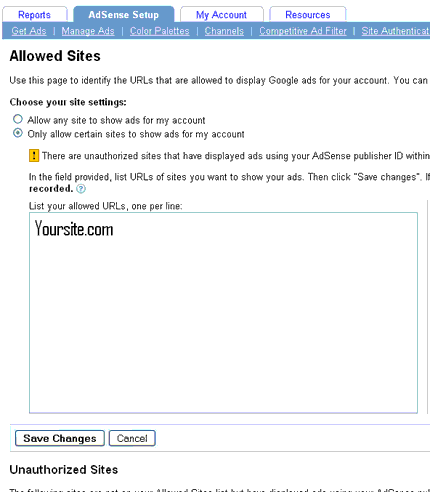
Also Google will provide you with information about sites that are not on your Allowed Sites list but have displayed ads using your AdSense publisher ID. This is a very useful feature and based on that information you can take necessary actions.
Also Read Online Plagiarism : How to Find if Someone is Copying Your Blogs Content?


Before you go, subscribe to get latest technology articles right in your mailbox!.