
Most useful Mozilla Firefox shortcuts
There are plenty of shortcuts available in Mozilla Firefox.Let us see the most useful keyboard shortcuts available in Firefox.
Easily Bookmark a page.
In firefox you can bookmark a page with a single key combination.
Press Ctrl + D and it will open up the Bookmark popup window and you can easily bookmark the page.
Switch between search Engines.
Major browsers like Firefox and Internet Explorer (IE) have dedicated search box.Let us see how can we use these search boxes effectively.
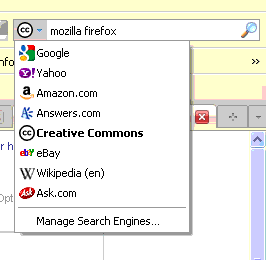
When you are searching something on Google and if you want to change the search engine you have to either use mouse of tab to get focussed on Search box.Then you need to change the Search Engine.
Now you can do this with two key combinations.
Press Ctrl + K and then Ctrl + Up or Ctrl + Down arrow to select different Search Engine and hit.
In IE you have to press Ctrl + E instead of Ctrl + K to get search box focus.
Open Bookmarks window
Hit Ctrl + I or Ctrl + B and you will get the Bookmarks window.You can select your bookmarked link from there.
Navigate between tabs
Ctrl + Tab will allow you to navigate between opened tabs.Also if you want to select the first tab press Ctrl + 1 and second tab by Ctrl + 2 so on.
Othe useful shortcuts
Ctrl + P -Print
- Ctrl + O – Open a document
- Ctrl + T – New tab.
- Ctrl + S – Save the web page.
- Ctrl + H – History.
- Ctrl + J – Downloads window.
- Ctrl + N – New Firefox window.
- Ctrl + Z - Select and change URLs in the address bar.
Sign up or join Globinch on Social Media
Stay Connected
Follow globinch
Popular Posts
- Search Engines for File Sharing Sites : Rapidshare Search, Megaupload and More 6 comment(s) | 16258 view(s)
- Turn your Windows 7 Computer Into a Personal Wi-Fi Hotspot 15 comment(s) | 16117 view(s)
- Google Translate Now supports Bengali, Gujarati, Kannada, Tamil and Telugu 2 comment(s) | 15714 view(s)
- Google Top Searches Today – Hot Google Search Words today 12 comment(s) | 11559 view(s)
- Best PDF OCR Tools to Convert Scanned images to Text / Word Documents 20 comment(s) | 10154 view(s)
- Globinch Search 0 comment(s) | 8401 view(s)
- Access Blocked sites, Unblock Restricted Websites 15 comment(s) | 7310 view(s)
- Free Online OCR Software to Convert Images Into Searchable PDF, Doc, HTML or Text 3 comment(s) | 7238 view(s)
- Password Revealer – How To Reveal- Show Password Behind Asterisks? 7 comment(s) | 7180 view(s)
- Play Angry Birds Game Free and Offline in Chrome Browser 1 comment(s) | 7049 view(s)
Recent Articles
- Best Free Tools to Enlarge Images without Losing Quality
- How to Track Your Gmail Email and Schedule Gmail Mail Free?
- Google Webmaster Unnatural Links Detected Warning & Penalty
- How to Use Trial Software Version Forever Without Expire
- How to Use Folder as Drive or Convert Folder to Drive?
- Add Buttons, Message Boxes and Text Highlights in WordPress Post
- Top 20 Free WordPress Social Share Plugins
- rel=”shortlink” Short URL Indicator and Its WordPress Support
- Pagination SEO Using rel=”next” and rel=”prev” Link Attributes
- Watch Live IPL 2012 Season 5 Online on Your Computer or Mobile


Pingback: Debug and Profile JavaScripts using Venkman - JavaScript debugger and profile tool. | Globinch
Pingback: How to Use Google goo.gl to Create Short URLs and tiny url | Globinch
Pingback: How to Turn Caret Browsing On or Off in Firefox and Internet Explorer 8 | Globinch
Pingback: Discover related websites Without Searching | Globinch