
There are many tips and tricks to help you to make Google Chrome browser more effective and user friendly. Google Chrome is one of the fastest browser around. It has many user friendly features bundled with it. Let us discuss few of the most useful Chrome features.
1. Setup multiple start up pages
In Chrome browser you can setup multiple pages to open during Chrome start up. This will help you to open the web pages that yo always open like Gmail, Google or even your favorite news sites or blogs.
To setup multiple start up pages,
- Click the wrench icon wrench icon on the browser toolbar.
- Select Options from the menu list(Preferences on a Mac).
- In the Options window open the basic tab and select the “Open the following pages” option and add the required pages there.
- Click close. When you open Google Chrome browser next time it will open these website pages during start up.
2. Open closed tabs easily
Suppose you closed a tab by mistake. Instead of going to history and open the last closed tab you can use the keyboard shortcut.Simply press Ctrl+shift+T to reopen it. You can restore up to the last 10 tabs you’ve closed. This feature is available with almost all browsers including Chrome, Firefox and Internet explorer.
3. Add custom search engines to Chrome
You can add custom search engines to Chrome browser.We have already discussed how to add you custom search engine to Google Chrome Search engine list in the post Create/Add Custom Search Engine In Google Chrome.
4. Use Chrome for conversions and calculation
You can use the Chrome URL address box as a tool for calculations and Conversions. These features are available with Google search that we discussed in 7 most useful Google Search features and Tricks.
Let us see how we can use these features in Chrome itself.
To do Calculations you can type the calculation you actually want to perform in the address bar. Chrome will display the result of the calculation. See the below screen shot.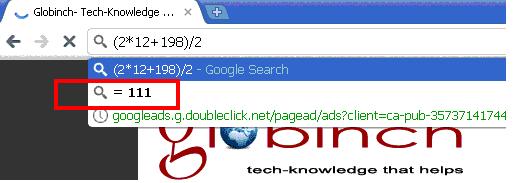
You can also perform conversions using Chrome. You need to type in certain format.for example if you want to convert mile to kilometer type “1 km in miles” . See the screen shot below.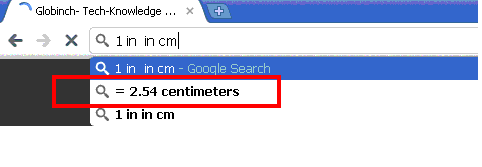
5. Sync Google chrome data with other computers
Google Chrome Sync allows to share data such as bookmarks and preferences between your computers.Google Chrome synchronizes data by storing the data online with your Google account. You can setup sync in easy steps.
- Click the wrench icon wrench icon on the browser toolbar.
- Select Options from the menu list(Preferences on a Mac).
- In the Options window open the “Personal Stuff” tab and click “Set up Sync”. In the popup you need to enter your Google account email and password. This will help Google to store your preference and bookmarks online.


Before you go, subscribe to get latest technology articles right in your mailbox!.
When I stumble upon a good article I usually do some things:1.Share it with all the close friends.2.save it in all my popular social sharing websites.3.Be sure to visit the site where I came accross the article.After reading this article I'm seriously thinking of going ahead and doing all 3…