
If your system is infected with certain Malware and Rootkit programs you may not be able to start your computer. Microsoft System Sweeper is really helps in this situation. System Sweeper from Microsoft is a recovery tool that can help you start an infected PC and perform an offline scan to help identify and remove rootkits and other advanced malware. Another very important use of Microsoft Standalone System Sweeper Beta tool is that this can be used if you cannot install or start an antivirus solution on your PC, or if the installed solution can’t detect or remove malware on your PC.
How to Use Microsoft Standalone System Sweeper
System Sweeper meant to be used in situations where you cannot start your PC due to a virus or other malware infection and not as a replacement of an ant-virus software. The tool needs to be installed on a removable drive like CD/DVD or a USB pen drive because it recovers your PC from any infections from malwares.
System Sweeper standalone tool will help you to create the bootable media on CD, DVD, or USB drive which is required to run the software on your PC.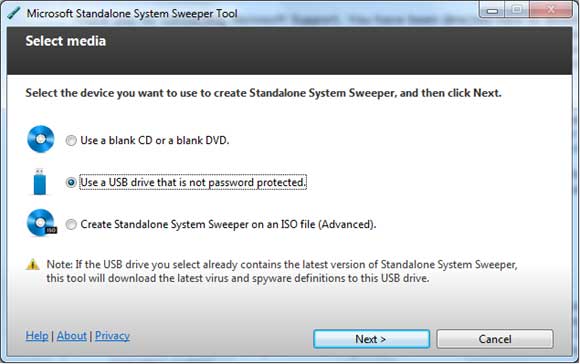
Make sure that you connected to internet while creating the bootable media. This is required because while creating the bootable media, Microsoft Standalone System Sweeper Beta downloads files from the Microsoft Download Center. If you do not have an Internet connection, the Microsoft Standalone System Sweeper Beta will not be able to create the bootable media.
Start Your infected computer from a CD, DVD or USB
Insert the Microsoft Standalone System Sweeper CD, DVD or USB in the computer infected with a virus or malware.
- Most of the computers will detect bootable media and enable you a one-time option of starting up from the CD, DVD or USB. In that case the computer will start from the Microsoft Standalone System Sweeper CD, DVD or USB device.
- If your computer do not automatically start from the bootable media
- You can interrupt normal start-up and enter the BIOS Setup Utility by pressing F2, F10, ESC or DEL key (Depends on your computer).
- Locate the “Boot Order” or “Boot Options” BIOS utility and locate the CD, DVD or USB device in the Boot list and hit enter key.
- Save your changes (F10 key)) to exit the BIOS Setup Utility and press “Yes” in the confirmation window.
Now the computer will start booting from the removable media.
Now whenever your PC gets hit from malware infection and you are not able to boot your pc, you can use this bootable removable media and the System Sweeper standalone will scan your PC for any infections and remove them. This will help you to start your PC normally.
System Requirements
- Operating system:Windows XP Service Pack 3 ( 500 MHz or higher and 768 MB RAM or higher)
Windows Vista (RTM, Service Pack 1, or Service Pack 2, or higher) ( 1.0 GHz or higher and 1 GB RAM or higher)
Windows 7 (RTM, Service Pack 1, or higher) ( 1.0 GHz or higher and 1 GB RAM or higher)
- Available hard disk space: 500 MB
- Blank CD, DVD, or USB drive with at least 250 MB of space.
Download Microsoft Standalone System Sweeper


Before you go, subscribe to get latest technology articles right in your mailbox!.
This really is a very good quality post.