
We have discussed many best and free URL shortner services , google url shortner, twitter url shortner, and how to use Your Own URL Shortening Service for Your Use etc. McAfee one of the most famous antivirus and security services provider has started the URL shortening service.
Today we discuss about different options available to use McAfee secure short URL service. There are many Free URL shortner services available. Google also provides goo.gl URL shortner service. Read below articles,
- How to Use Google goo.gl to Create Short URLs
- How to Track Goo.gl Shortened URL History and Analytics?
Using the mcaf.ee service users can create short URLs, which are checked against McAfee’s GTI databases prior to being shown to the end user.
Options to use McAfee URL shortening service
We have different options to use McAfee URL shortening service. You can use the mcaf.ee service directly or you can use directly from web browsers like Chrome and Firefox using the add-ons and extensions.
Create short URL using mcaf.ee URL shortening service
You can directly use the service from http://mcaf.ee/ . You can create compact links easily. Also you can share the links with Facebook and Twitter with the click of a button. Se below.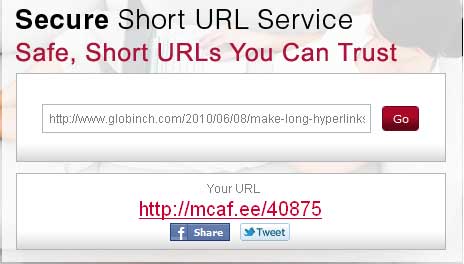
Generate Secure Links Right From Your Browser
There is firefox plugin and Google Chrome Extensions available for McAfee Secure URL Shortner Service. using these plugins you can create short links with a single click.
Google Chrome McAfee Secure URL Shortner Extension
Google Chrome extension can be used to create short URL using mcaf.ee service.
- Install the Google Chrome McAfee Secure URL Shortner Extension from here.
- This wil add a button next to thr URL address bar. See below.
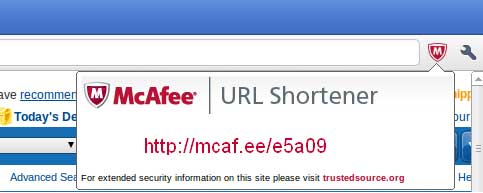
- To convert any URL just click on that button after opeing the page in the browser.
Firefox McAfee URL Shortner Plugin
The firefox plugin allows you to quickly use McAfee’s secure short URL service, mcaf.ee.
Install the Firefox McAfee URL Shortner Plugin from here.
This will add an entry in the right click context menu.
Right Click on any URL and select the “Shorten with mcaf.ee” option.


Before you go, subscribe to get latest technology articles right in your mailbox!.