
Google provides an extremely useful language translation service. Google Translate supports around 65 languages and recently they included translation support for Indic languages like Bengali, Gujarati, Kannada, Tamil and Telugu. Using this service you can translate texts and documents.
Apart from Google Translation service there are other tools available for translating documents and text. Google and Bing even supports real time chat translation.Apps are available for smart phones that make use of Google Translation service. For website real-time translation you can even use the Google website translation gadget.
Related:
Language Translation Tools For all Your Needs
Let us check the translation tools available for our daily needs. Be it website translation or document translation.
Tools to translate your documents online and offline
There are excellent tools and services available to translate documents from one language to another.
Translate documents Online using Google Translate
Using Google Translate for documents you can translate a document fro and to 65 different languages.
Free Language Translator from CodePlex
Free language translator application is a desktop language translator application which uses the Google translation service to translate from one language to another.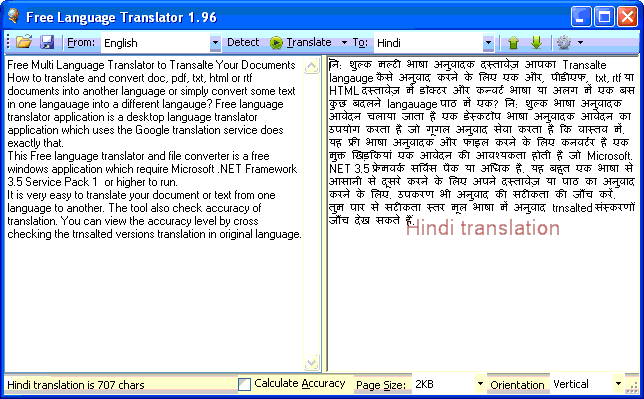
Translate Text directly to another language online
Instead of documents you can directly translate text from one language to another using Google Translate. This helps you to immediately translate portion of a document like email content from one language to another. Google translate automatically detects the language of the input text.
Translate Chat in Real-Time
You can now translate the chat messages real time. This helps sometimes if you want response to a person who uses another language.
For GTalk messages you can make use of Google Talk Translation Bots allows you to talk to people in different countries in their language even if you don’t know that language
For Windows live messenger, Windows Live Messenger Translation Bot (TBot) does translations for you in real time.
Translation Gadget for your Website
The Google website translation gadget from Google Translate gives you the feature of automatic translation of the web pages. It supports more than 65 languages as of now.
Translate words instantly from English with Google Toolbar
With Google Toolbar, you just pause the pointer over an English word, and the Word Translator displays that word’s meaning in your own language.
Get Google Toolbar
Website Translation Add-ons for Browsers
Most of the website and blogs doesn’t provide inbuilt translation support. In that scenario website translation add-ons will help you to translation to your language.
Top 5 Firefox Website Translation Add-ons
Latest apps for smartphones also support translations using Google Translate. 1Google Translate for iPhone app can be downloaded from App Store.


Before you go, subscribe to get latest technology articles right in your mailbox!.