
There are many tools to Minify JavaScript, JQuery or minify CSS files and will help you in the process of website optimization. Minification of script files reduces the size of these files and will yield considerable improvement during the page load. Jquery or CSS files may increase in size based on the features you implement on your website. Minification of these files by removing unnecessary characters from the source files.
JavaScript and Minify tools should be before the code deployment. In other words the JavaScript and CSS compressions using the GZIP/DEFLATE compression techniques should be applied on scripts file which are already minified using the minify tools.
Let us find few of the tools that help you to minify your JavaScript and CSS files.
Best Tools to Minify JavaScript, CSS etc
Microsoft Ajax Minifier
Microsoft Ajax Minifier is a command line tool from Codeplex. After you install the Microsoft Ajax Minifier, you can use the tool from the command line.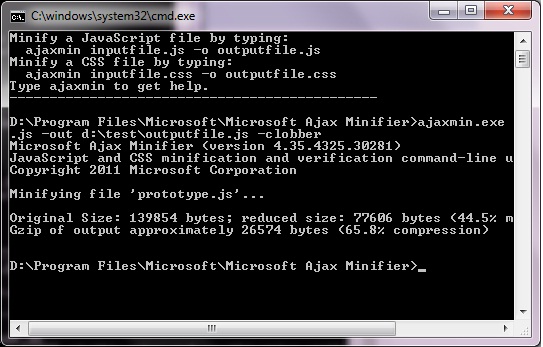 You can open the tool from the Microsoft Ajax Minifier program group. You can use the tool by using the following commands.
1 | ajaxmin.exe sourcefile.js |
The above command will display the minified output to the STDOUT stream.
The below command will automatically save the minified output to a file called “outputfile.js”. Use the “-clobber” option to overwrite if the output file already exists.
1 | ajaxmin.exe sourcefile.js -out outputfile.js -clobber |
The command below will analyse your script for possible bugs.
1 | ajaxmin.exe sourcefile.js -analyze |
You can also combine multiple JavaScript or CSS files to a single output file after the minification. You can use the following format to combine multiple files.
1 | ajaxmin.exe source1.js source2.js source3.js -out outputfile.js |
Microsoft Ajax Minifier will minify both JavaScript and CSS Stylesheets. But you cannot mix the file types in a single instantiation.
Get Microsoft Ajax Minifier
Google Closure Compiler
Google Closure Compiler can be used to minimize and optimize JavaScript files. The Closure Compiler compiles JavaScript into compact, high-performance code. We have discussed about Google Closure Compiler in detail in the below article.
Google Closure Compiler to Minimize and Optimize JavaScript Online
YUI Compressor
The YUI Compressor is written in Java and relies on Rhino to tokenize the source JavaScript file. The CSS compression algorithm uses a set of finely tuned regular expressions to compress the source CSS files. The tool obfuscate local symbols during JavaScript minify process. YUI Compressor requires Java 1.4 or greater versions to run the program.
The following command line (x.y.z represents the version number) will minify the file myfile.js and output the file myfile-min.js.
1 | java -jar yuicompressor-x.y.z.jar myfile.js -o myfile-min.js |
JSMin
JSMin is a filter that omits or modifies some characters. . It typically reduces file size by half, resulting in faster downloads.JSMin is one of the respected Minification and optimizer tool for JavaScript.
Get JSMin
Minify
Minify is a PHP5 application that combines multiple CSS or JavaScript files, removes unnecessary whitespace and comments, and serves them with gzip encoding and optimal client-side cache headers.
Many WordPress plugins such as WP-Minify and W3 Total Cache uses Minify.
Get Minify


Before you go, subscribe to get latest technology articles right in your mailbox!.
Thank you for your helpful resource. Downloaded and tried Ajax minifyer straight on! The tool is great and straightforward. For a Windows environment, it’s perfect. Thanks again. Irene