
The new Themes and autocompletion features added to Google Custom Search Engine (CSE) allows you to Customize the Look and Feel of Your Google Custom Search Engine. This new features and looks of new CSE will definitely increase the site search yielding more revenue from AdSense for Search. Normally you create Google custom search engine and add Google search to your website and you can monetize the search feature by opting for Adsense for Search option. We have already discussed AdSense for Search Optimization Tips and tips like “Error while trying to save your AdSense for Search settings – How to resolve?” etc.
The default look and feel of custom search engine is common among many blogs and websites.
Recently Google has added lots of new feature to Custom Search Engines.
New features like Custom Search with Themes gives more control over search results presentation.
You can customize your custom search further by changing fonts, colors, backgrounds, promotion settings and features such as tabbing and mouse-overs.
Read related posts,
- Google Top Searches Today – Hot Google Search Words today
- Most Searched Words and Most Popular Keywords on Internet
Using the new Themes option you can achieve different look and feel options for your search results. To configure this you need to select the advanced features in the configure Google custom search page or access directly access here. See below.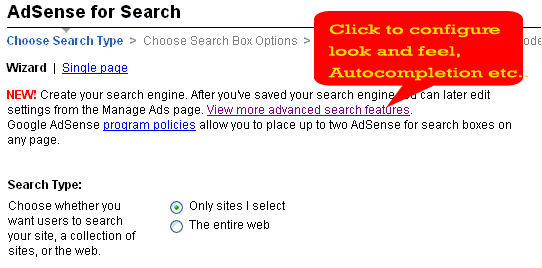
Enable Google Custom Search Auto-completion option
This is one of the interesting feature addition to the Custom search engine.As you type into your search engine’s search box, Autocomplete offers searches similar to the one you’re typing.
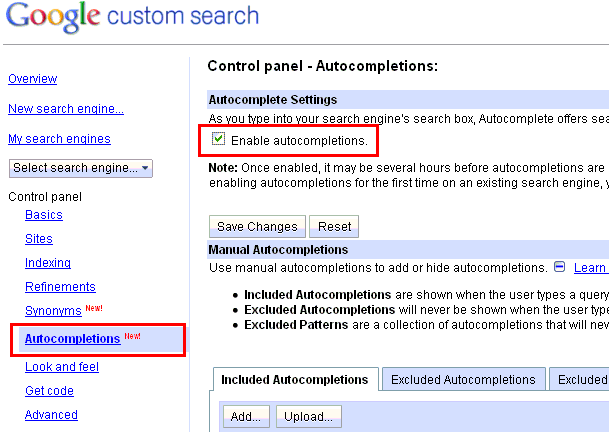
To enable this, you need to go to the CSE control panel and select the Autocompletions option from the right side menu.
- Select the “Enable autocompletions” check box.
- Click “Save Changes’ button.
- As mentioned there if you are enabling autocompletions for the first time on an existing search engine, you need to update the code snippet. There are mutiple options available to exclude from autocompletion. You can configure “Included Autocompletions” which are shown when the user types a query. “Excluded Autocompletions” will never be shown when the user types a query. “Excluded Patterns’ are a collection of autocompletions that will never be shown and are defined using a regular expression.
How to change the look and feel of Custom Google Search using new Themes
If you are creating a new custom search engine for search or if you are editing an already existing custom search, you can easily apply the new themes arn result page option with few simple steps.
- GO to the Custom search engines (CSE) control panel and select the Look And Feel option from the right side menu.
- Choose the hosting options from right side
- Choose your favorite layout for Search element, it can be full width, compact or two column layout.
- Choose or customize a style. There are many styles available.
- Save and get the code. This code you need to update in your web pages where you want the custome search engine (search box) to appear.
See below.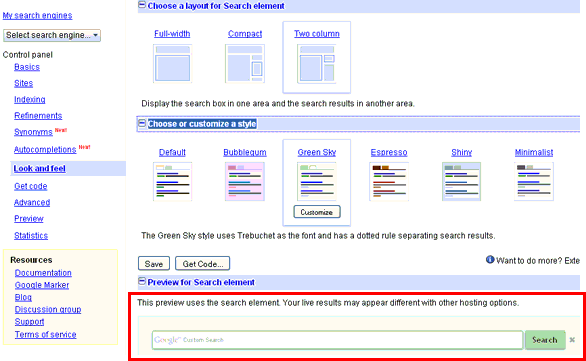


Before you go, subscribe to get latest technology articles right in your mailbox!.