
When it comes to online backup storage or free backup online there are few services with really impressive features. Online storage especially free online backup services always comes attached with limited online storage or not so user friendly access interfaces. We have already discussed about some of the best free backup and free online storage services available like Windows Live SkyDrive , GMail Drive and Drop.io . Also we have discussed about Best Services to Send and Share Large Files Over Web .
Here is another free service IDriveSync from IDrive ,using which you can backup your data online, share your data with friends or colleagues, access and sync across multiple PCs or Mac. Free account offers you 2GB of space. You need to register and install IDriveSync on the PCs or Mac systems you want to sync and share data. Paid version offers more storage space.
Even though the free storage is just 2GB but the user interface to access and modify data is really impressive. I would say this is one of the best interface to access , update and share your data online. The clean and easy way to access the data is one of the priority feature required for any free online storage service. Even though there are other free storage services available, the free account will have limited features. IDriveSync scores over those because of its easy and neat user interface and share mechanism. Only extra “burden” required here is that you should have IDriveSync installed on your systems on which you are planning to access your online data. Below details are some of the key features of this software.
After installation the tool opens up a ‘Sync’ area where you can add your files one-time or choose to add and update your files on subsequent changes from anywhere on your PC / Mac. This serves as an online backup of your data. Now you can install IDriveSync and login to IDriveSync on multiple PCs / Macs using same authentication, the synced data is ‘Synced-Down’ onto those multiple computers.
The interesting feature is that if you make a change to synced data anywhere on any of those multiple computers, all the computers will shortly reflect the modified data.
Sharing data with others
You can also share your data with others. Right-click the file / folder you wish to share and then provide the email address, and set the share permission like Read or Read-Write. Once shared the share recipient will get an email that displays information about the share and sender. He/She has to enter the Share ID in a text box provided on the top left corner of the IDriveSync Classic interface to view the shared data.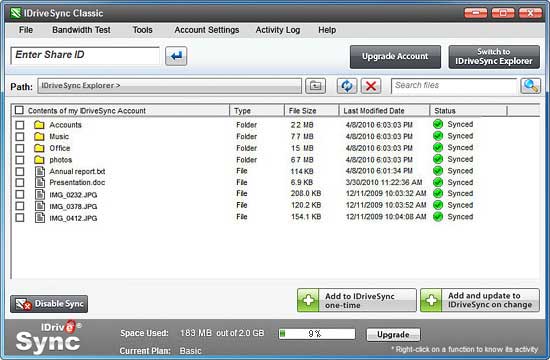
You can access search and share synced files available in your IDriveSync account directly via the web also.
Sharing and backup data volume/size
IDriveSync free account offers you a basic 2 GB Free Storage.IDriveSync supports sync up-to 5 computers and sharing of files of all sizes and types up-to 50 accounts. Using the free account you can sync up-to 2 GB of data.
Regarding security of your data as mentioned here “Your files and folders are transferred using 128-bit SSL (Secure Socket Layer) technology. Data stored at our world-class data centers is encrypted using the encryption key (known only to you in case you set the private encryption key). IDriveSync uses 448-blowfish encryption on storage (same as that used by banks and the military).”
Also you can avail the live support here.
System Requirements
Windows
- Windows 7
- Windows 2008 Server
- Windows Home Server
- Windows Vista
- Windows 2003 Server
- Windows 2000 Advanced Server
- Microsoft Windows 2000 (Service pack 4)
- Windows XP Home/Professional
- 512 MB RAM, 10 MB free hard disk space
Mac
- Mac OS X 10.5 or greater
- 500MHz Intel processor
- 256 MB RAM
You can Download and start using IDriveSync from here.


Before you go, subscribe to get latest technology articles right in your mailbox!.