Most of us use multiple web browsers to browse Internet. Each of these web browsers, be it Internet explorer, Google Chrome or Firefox provides their own mechanism to view the browsing history. You can clear browsing history or you can manage them using these browser specific features. Unless private browsing is turned on the history will have list of all the URLs you visited.
But if you use more than one browser, then viewing these individual browsing history windows will be a pain. There are certain free tools that will help you to view all these browser histories in one place. You can view them, clear them and do whatever you want from a single point.
Related Posts:
- One Click Browser Cleaner-Clean Browser History, Delete Temporary Files of All Browsers
- CCleaner to Clean Browsing History and Optimize Performance
These tools automatically detect the right history database file based on the browser and current user configuration. Here we discuss few such useful and free tools to manage your browser history in one place.
Tools to View Browser History of All Browsers in One Place
History Viewer
History Viewer is an efficient tool that helps you easily view the history of all that has been done on your computer. This tool does more than showing you the browser histories of Internet Explorer (URL history, address bar, Cookies and index.dat files), Mozilla Firefox (URL history, Downloads and Cookies) and Google Chrome (URL history, cookies and downloads) but also shows details of opened files, viewed movies or images, and so on. Get History Viewer
Browser History Spy
Browser History Spy is all-in-one software to instantly recover or view the browsing history from popular and top three browsers Firefox, Chrome and Internet Explorer. It automatically detects the right history database file based on the browser and current user configuration.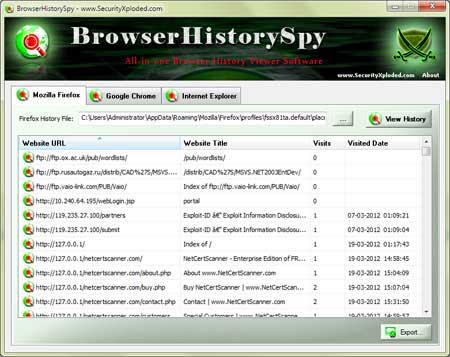 Get Browser History Spy

