
Many people uses Google Calendar to manage their appointments and time . So it is very important to backup your Calendar in proper format so that you can export or import Calendar to other applications. Google Calendar now supports backup feature. Using this you can backup your Google Calendar as and when required.
In fact you can chedule automatic backup of your calendar based on predefined intervals.
Many download tools supports scheduling automatic download. We can utilize that feature to schedule Google Calendar Backup task.
You can backs up your Google Calendar in ICS and XML formats. If you save it in ICS format you can import your calendar into another calendar tool like MS Outlook.
How to Schedule Google Calendar Automatic Backup?
- Login to your Google account
- Go to Google Calendar.
- Click the Settings link under “My Calendars”.
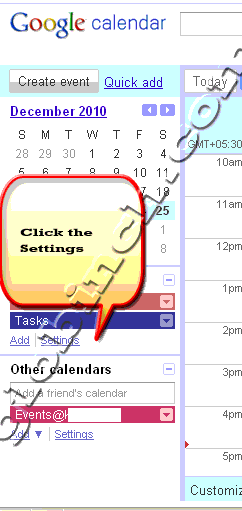
- In Calendar Settings under “Calendars” tab click on your calendar name.
- Scroll down the Calendar Detail page to see “Private Address“. As mentioned in the Calendar help “Your calendar’s Private Address is designed for your use only. All of your calendar information is available via your private links, so don’t share this address with others.“.
- Select the required format. Three options available. XML, ICAL and HTML
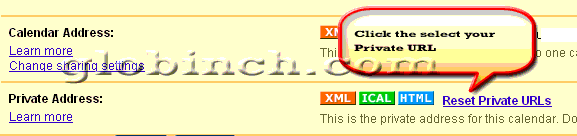
- Click on ICAL (or the format which you want).
- The popup will display the private address. You can use use the address to access your calendar from other applications. The same address we will use to schedule the automatic backup of the Google Calendar
You can copy and paste this private address into any calendar product that supports the iCal format.
You can use this URL to configure and schedule automatic download in any download manager tool. For example if you are using Speedbit‘s Download Accelerator Plus as your download manager, you can schedule download as below.
- Go to Tools-> Options and configure Scheduler as seen below.
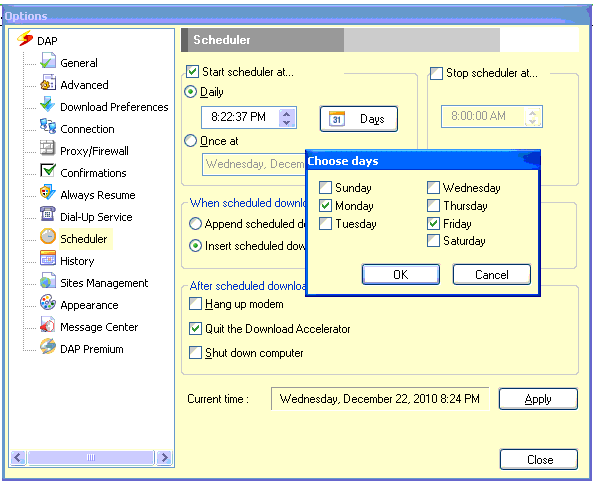
- Add a new download by adding your private address. On save dialog select “Schedule” option.

Now DAP will take care of backing up your Google calendar every Moday and Friday at 8.22.37 PM
If you don’t want to schedule it and want to just save the file, then you paste the URL in the address bar of any browser and hit enter. This will automatically opens the respective download tool to download and save the iCalendar file.
Once saved you can use the backup file in any calendar tool that supports ICAL format including Microsoft Outlook.


Before you go, subscribe to get latest technology articles right in your mailbox!.
Thanks for the tip. I guess the way I would approach it would be to download the private URL via wget or pavuk, then use a namedate utility to rename the downloaded file. That way, a scheduled task can run at intervals and not have a system tray app having to stay active.
For a purely cloud option, consider Flatly.io, which flattens Google Calendar to Google Sheets or Excel Online (OneDrive) automatically, on a scheduled basis. Disclosure: I work at Flatly.