
If Google detects that your site is violating Google Webmaster guidelines Google may penalize your site. If that happens you will see a sudden drop in page rank or your site may disappear from Google search results.
To get more information on what actions might have led to any search engine penalties read the post 5 Important steps to avoid Search Engine Blacklisting and Top 6 Mistakes You Should Avoid in SEO.
Also in some scenario if Google detects malware in your site , that will lead to the removal of your sites indexed page from Google. In these scenarios you need to take appropriate action to clean the malware before requesting for reconsideration. Also you need to take necessary steps to avoid repetion of such attacks and infection by taking appropriate security measures.
The other scenario is that you recently purchased a domain that you think may have violated our guidelines before you owned it. In this case also you apply for site reconsideration.
Necessary steps to do before requesting site reconsideration
If your site violates Google Webmaster guidelines , you need to do a thorough check to verify and identify the violation and take necessary steps to correct them. In the other scenario where Google blocks your site because of malware infection , you can approach your hosting authorities to clean it up. You also need to make sure that your computer is armed with a good anti-virus software. Read more about top ten anti-virus software review.
How to ask Google to reconsider your site?
Once you are ready , you can ask Google to reconsider your site. To submit a reconsideration request, You should have a Google Webmaster Tools account. If you do not have one , you can create it here. After creation you can follow the steps described below.
- Login to youe Google Webmaster Tools account.
- You need to add and verify your site. For more info on this please read this post.
- In the left side menu click the “Site reconsideration” link. See below
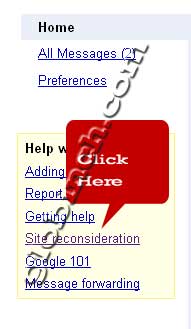 Or click here https://www.google.com/webmasters/tools/reconsideration
- In the drop down list you can choose the site which you want to submit to Google for reconsideration. Please note that only the sites which are added to webmaster central and are verified only will appear in the drop down list.
- You also need to provide a brief description about what happened or what actions might have led to any penalties and what corrective actions have been taken.
As mentioned in the same page “Please allow several weeks for the re-evaluation.” the reconsideration process may take from few days to several weeks to complete.


Before you go, subscribe to get latest technology articles right in your mailbox!.