
Google Free Web fonts offer hundreds of free and optimized fonts for web. The Google Web Fonts directory is directory of core web fonts that you can utilize for your WebPages. The Google Web Font API can be utilized to make your web page look great. All these services are free and implementation is very easy. Google Web Fonts implements Monotype Imaging’s MicroType Express compression format this will help them to load faster.
Adding Google fonts to a web page is very easy and you can complete the process in few seconds. All you need to add a link to the Google Web Font style sheet and refer the same in your CSS styles.
Related:
How to Add Google Web Fonts to Web pages.
As we mentioned it is very easy to add Google Web Fonts to a web page. You need to provide a link to the style sheet in the <head> section of your page or document. The link should be similar to the below.
1 | <link rel="stylesheet" type="text/css" href="http://fonts.googleapis.com/css?family=FontName"> |
Here “http://fonts.googleapis.com/css” is the base css URL. It accepts a query parameter “family“. You can specify any valid name for the “FontName“. Once added you can use the font-family in the CSS section. For example
1 2 3 4 5 | <style>
.someClass { font-family: 'FontName', serif;
font-size: 48px;
}
</style> |
Where the “FontName” should be replaced with proper font name.
In the above example “Inconsolata” is the font family. So the CSS style can be changed to
1 2 3 4 5 | <style>
.someClass { font-family: 'Inconsolata', serif;
font-size: 48px;
}
</style> |
Your page may be using more than one web font. How do we link to multiple font css? Linking multiple fonts allows you to use all of those fonts in your page. You can specify multiple fonts in URL string separated using “pipe” symbol. See the example below.
1 | http://fonts.googleapis.com/css?family=Tangerine|Inconsolata|Droid+Sans |
This will load the fonts Tangerine, Inconsolata and Droid Sans respectively.
The following code shows example usage of the Google Web Fonts
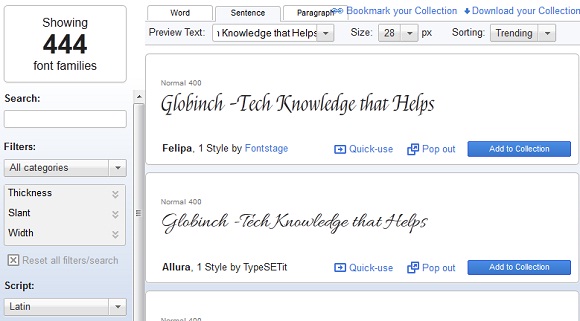 You can preview the Google Web Fonts and select the one that you want to include in your web pages. Also you can add a specific font family to your font collection, or you can even download the complete font (TTF) collection.


Before you go, subscribe to get latest technology articles right in your mailbox!.