
We already discussed about Google +1 Button Plugins For WordPress Blog. Google +1 Button helps people discover relevant content and if you add the +1 Button to your website or blog page lets users recommend your content. The recommended page will be visible to their friends and contacts. This may increase your site’s visibility.
Everybody can see aggregate annotations and Google signed-in users will see personalized annotations from their friends and contacts. When you compare Google Buzz button and Google +1 button, the Google +1 button recommend web content to people in the context of search results and buzz is used for sharing and starting conversations about interesting web content among your network.
How to Add Google +1 Button To Website or Blog Without Using Plugins?
Google provides code snippet that can be directly added to your website content or your page template. The Google +1 button is available in 40 languages and you can place multiple buttons in the same page.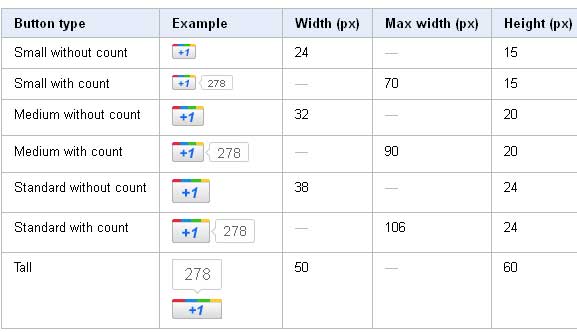
Google +1 buttons are available in four different formats. Small (15px), medium (20px), standard (24px), and tall (60px).
The +1 button code is given below.
1 2 3 4 5 | <!-- Place this tag in your head or just before your close body tag --> <script type="text/javascript" src="http://apis.google.com/js/plusone.js"></script> <!-- Place this tag where you want the +1 button to render --> <g:plusone></g:plusone> |
As mentioned above the first piece of code should be placed in <HEAD> section or before </BODY> tag. The second section of the code can be placed wherever you want the Google +1 button to appear. The above code is for normal button. If you want to add a different type of button, then you need to add a parameter in the code as shown below
1 2 | <!-- Place this tag where you want the +1 button to render --> <g:plusone size="small"></g:plusone> |
Similarly if you want to add a medium size(20px) button then add size=”medium” and for tall(60px) the parameter value will be size=”tall”.
Additionally you can add advanced options to the +1 button. In small, medium and standard buttons you can avoid the button count by adding the “count=”false” parameter.
1 2 | <!-- Place this tag where you want the +1 button to render --> <g:plusone size="small" count="false"></g:plusone> |
Also if you wat to add a URL to +1, you can add the href=”your_url_to_pls_one” parameter as given below.
1 2 | <!-- Place this tag where you want the +1 button to render --> <g:plusone size="small" count="false" href="your_url_to_plus_one"></g:plusone> |
Also if you are good at JavaScript you can add a callback function as below
1 2 | <!-- Place this tag where you want the +1 button to render --> <g:plusone size="small" count="false" callback="function()" href="your_url_to_plus_one"></g:plusone> |
Read the complete documentation on Adding the Google +1 button to your site.


Before you go, subscribe to get latest technology articles right in your mailbox!.