
Google recently renamed “Google Suggest” to “Google Autocomplete” as part of launch of Google Instant. Google search autocomplete feature is a major feature addition to the Custom Search Engine (CSE). CSE control panel gives you the flexibility to mark google autocomplete off or on. Let us discuss how to configure autocomplete on Google custom search and how does that affect your Adsense for Search ?
You may have created some custom search engines for you blog or website. Also you may have already linked those Custom Search Engine to your Adsense account (Read: Top 5 Adsense alternatives) to earn some extra bucks from the search that your visitors perform during their visit.
Let us discuss how this new Google Autocomplete is going to improve your visitors search experience with your CSE. Let us also discuss the impact of this Google Autocomplete on your Adsense for search earnings.
Related article : Improve Google Custom Search With Themes and Autocompletion Feature 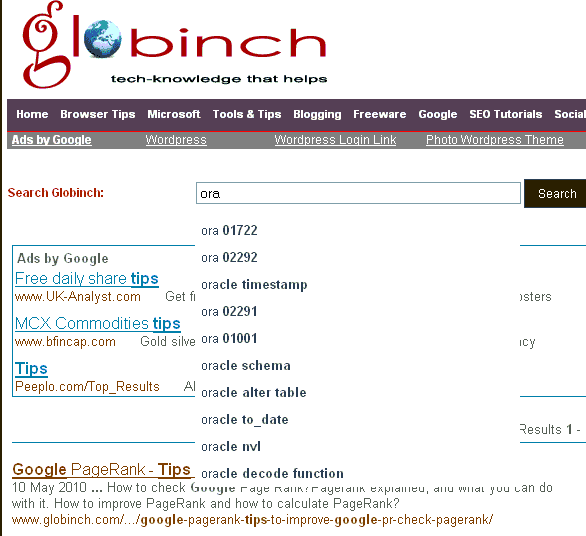
Google Autocomplete and Adsense for Search
Since Google provides Autocomplete feature and the search result page will have more accurate search result, the Google context sensitive advertisements that are going to appear on search result page will be more relevant. This will have a direct impact on your ad click rate.
Since the ads that are appearing on the result page is more relevant now, chances are more that the readers will click and visit those advertisements. That means these relevant ads will improve the conversion rate. This will directly improve your Adsense revenue.
How to enable Google Autocomplete on your blog’s custom search engines?
It is pretty easy to enable to Google Autocomplete feature on your custom search you have created.
- To configure this you need to select the advanced features in the configure Google custom search page.
- Alternatively you can directly access here.
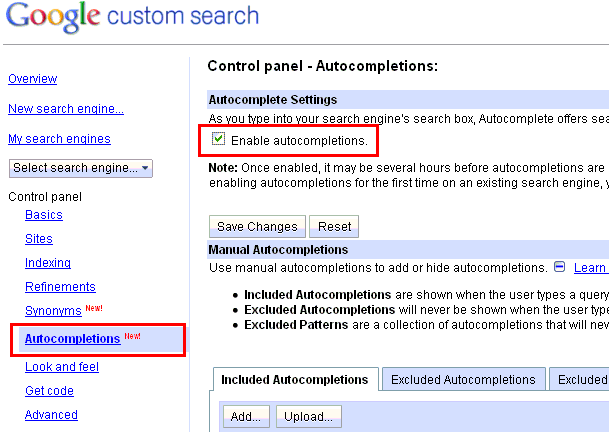
- Select the “Enable autocompletions” check box.
- Click “Save Changes” button.
- As mentioned there if you are enabling autocompletions for the first time on an existing search engine, you need to update the code snippet. There are mutiple options available to exclude from autocompletion. You can configure “Included Autocompletions” which are shown when the user types a query. “Excluded Autocompletions” will never be shown when the user types a query. “Excluded Patterns’ are a collection of autocompletions that will never be shown and are defined using a regular expression.


Before you go, subscribe to get latest technology articles right in your mailbox!.