
This article discusses about Google Chrome browser privacy and some of the Chrome privacy issues. Google Chrome became one of the most popular web browser.
Google has made it lightweight and fast. Google Chrome has lots of safety features and features that makes the browser a fast and reliable browser.
Google Chrome maintains a client id or Unique Id which is unique for every Chrome user which can be used to create profiles of a user’s actions while using Google Chrome. These data collected by Google will help them to prioritize the features and improvements. If you want you can disable this feature of sending information to Google.
Privacy and security settings in Google chrome
Usage statistics contain aggregated information such as preferences, button clicks, and memory usage. You can disable the “sending usage statistics and crash reports to Google” option. If you disable this option Google will not send Chrome usage statistics and crash reports to Google.
You can disable or enable this option by following the below steps.
- Click the wrench icon tools menu on the browser toolbar.
- Select Options or Preferences(Mac).
- Click “Under the Hood” tab.
- In the “Privacy” section, select or deselect the “Help make Google better by automatically sending usage statistics and crash reports to Google” check-box to turn this setting on or off.
- Click Close.
Protect your privacy and remove the Chrome unique ID using Chrome Privacy Protector
As we discussed above Google Chrome is using a client_id variable which is unique for every Chrome user, and which can be used to create exact user profiles of a user’s actions while using Google Chrome.
Chrome Privacy Protector is a freeware tool from Aquila Security Software that automatically deletes the unique Client ID before each run of Google Chrome. After installation launch Chrome Privacy Protector, and then close all Google Chrome windows now in case that it is currently launched, and then click the “Remove unique ID now” button to anonymize your Google Chrome. See below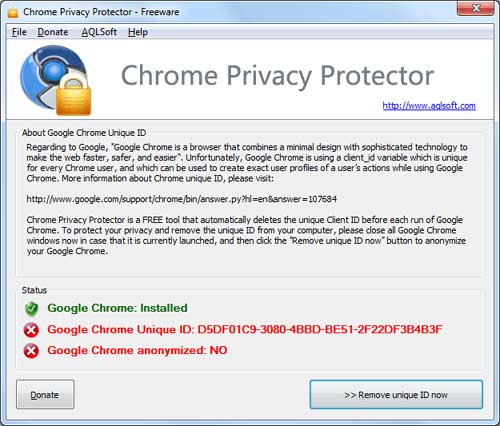
Download Chrome Privacy Protector


Before you go, subscribe to get latest technology articles right in your mailbox!.