

Windows Azure Storage provides non-database storage in the form of blobs, queues, and tables. Window Azure Storage Explorer tools allows you to explore the storage data and perform actions on them. As you know Windows Azure is a public cloud service from Microsoft that allows you to quickly build, deploy and manage applications across a global network of Microsoft-managed data centers. Windows Azure offers cloud Platform as a Service (PaaS), Windows Server and Linux virtual machines.
You can deploy your website that scale up as your traffic grows. Azure also offers enterprise-ready Hadoop PaaS service. Windows Azure is also widely used as a CDN service that powers many website and web applications.Windows Azure Storage is the area of the Windows Azure Cloud Computing platform.
Related Articles:
- Backup Your Data To Amazon Cloud Drive For Free
- Importance of Using CDN to Speed Up Website
- Top 5 Plugins to Backup WordPress Site to Cloud Storage
There are many azure storage explorer tools to manage your Windows Azure Storage data. Windows Azure Storage Explorer from CodePlex is one such free utility.Azure Storage Explorer allows you to work with one or with multiple storage accounts. Using the tool you can any time add new storage account or remove the already configured storage account.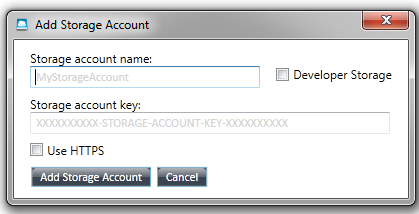 Each storage account opens a new tab. Each storage tab shows the following.
- Tool bar for selecting the kind of storage to view and performing operations.
- Folder pane that shows blob containers, queues, or tables.
- An item pane that lists blobs, messages, or entities for the selected item in the left pane.
- A heading which shows the selected container name and item count
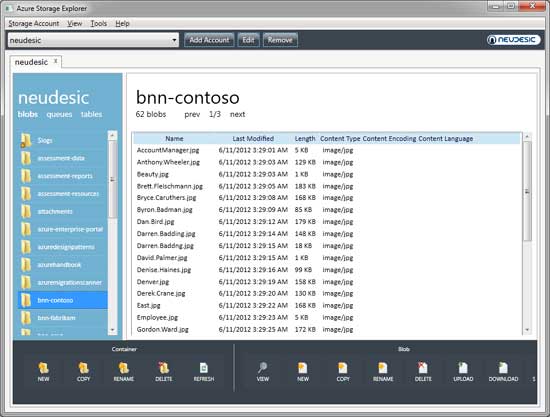 The Content Type settings (Tools > Options) are used to allow blobs uploaded from files to have their Content Type property set automatically based on the file type. To view Blobs, open a storage account tab or click the blobs link at top left. The left pane will list blob containers. The Container tool bar allows you to take actions on containers.Using which you can create new, Copy, Rename, Delete or Refresh container list.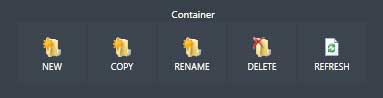
You can also upload local disk files to your Azure blob storage. You can download blobs to local disk files. Select the blob(s) to download and click the Download button on the Blob tool-bar.
You can also change containers access levels by going to the Container Access tab, select the desired access level, and click the Update Access Level button. You can also generate Shared Access Signature using the tool where you can specify permissible actions (read, write, delete, list) and a time window of validity. You can alos work with Queues and Tables using the Azure Storage Explorer.
You can do lot of other actions on your storage data using the Azure Storage Explorer.
Get Azure Storage Explorer


Before you go, subscribe to get latest technology articles right in your mailbox!.