
How to change Firefox tab width so that you don’t have to scroll left and right to see all windows? If you change tab width or decrease tab width of Firefox browser tabs you can view more tabs together. Firefox default maximum tab width is 250,that reduces the number of tabs displayed to just a few. The default minimum tab width is 100.
If you use the default minimum width you can view 10 tabs maximum without using the left or right scroll buttons. When you have many tabs open, you need to navigate using the tab scrolling arrows.
If you change minimum width to 50 then you can view at least double the number of tabs without using scroll buttons. Even if you make it 50 or 40 you can still identify the opened tabs based on the favicon displayed. You can change the tab width in Firefox by changing the configuration settings of Firefox.
In the previous articles we have discussed about how to Enable or Disable Caret Browsing in Firefox and in Internet Explorer . In this discussion we see how to change the Firefox browser tab width,
Firefox tab width : How to change tab width?
To change minimum and maximum widths of Firefox browser tabs you need to edit the Firefox configurations. Be aware that certain setting changes could crash your Firefox browser. To change browser tab width follow the below steps.
- Open FireFox browser
- Type about:config in address bar and press enter.
- Type “browser.tabs.tab” in the filter box.
- In the filtered list change the value of “browser.tabs.tabMaxWidth” to 100 and “browser.tabs.tabMinWidth” to 50. See screen shot below.
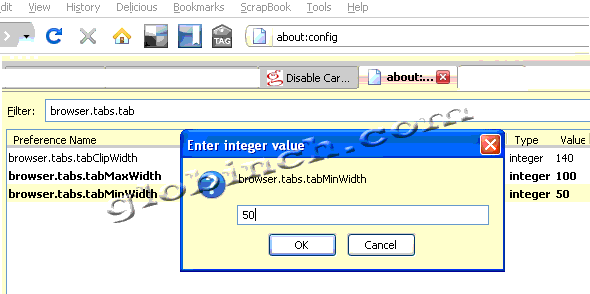
- Restart Firefox or open a new browser instance.
- You can see the tabs with new minimum and maximum width. See below.



Before you go, subscribe to get latest technology articles right in your mailbox!.
In latest Firefox 4/5, add the settings to the 'userChrome.css' file:
C:Documents and SettingsuserApplication DataMozillaFirefoxProfilesdefaultchromeuserChrome.css
.tabbrowser-tab[fadein]:not([pinned]) {
min-width: 0px !important;
max-width: 30px !important;
}
may need to adjust the path to suit your system and the pixels desired. The above will show just the tab icon, which I find enough to identify them. Plus they're placed consistently instead of shrinking & expanding depending on when more/less tabs are open.