
Web server monitoring is essential to check the uptime of your website. How do you check server status frequently? There are many free web server monitoring services available to ping the website and notify the status. Another way to do web monitoring is by accessing the URL of the website. This is not practical. In this scenario browser plugins and extensions comes handy. There are plugins available for Firefox as well as Google Chrome to check the web server status. Some of these plugins ping the web server frequently to check the status. This time period is configurable too.
Just in case if you missed it, you can quickly go through some of the other plugins and install your favourite Chrome and Firefox extensions:
- Top 7 Firefox Web Developer Extensions and Plugins
- Top 25 Mozilla Firefox Security Add-ons
- Top 5 Firefox Website Translation Add-ons
- Top 15 Google Chrome Google+ Extensions
We know about there are some free service which will notify you via Email when ever your site goes down. But browser extensions help you to check the web server status as and when required.
Server Monitor – Chrome web server monitoring extension
Server Monitor is a useful chrome extension that helps you to monitors any number of URLs for connectivity and content specified by you. The extension also displays status icon for quick reference. This extension allows you to poll one or more URLs at a user-defined interval to check the web server status. This time interval is completely configurable. See below.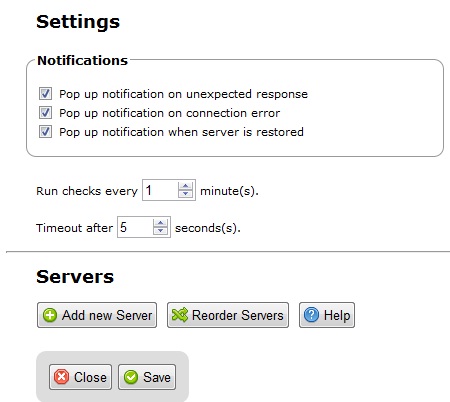
The Server Monitor icon itself gives a quick view of the status of the servers configured. The colored sphere icon split into as many sections as the number of sites. Each section is colored based on the response from the monitored URL. Green means the site responded with the content that was expected. Yellow means the site responded but the content was different than expected. Red means the site failed to respond. See below. Also on click of the icon tells you which server is down and which one is up. In the below image there are three servers configured and only two are up and running.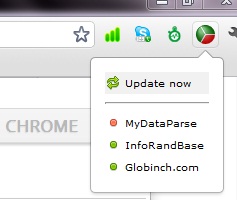 Try Server Monitor
WebSitePulse Current Status Firefox add-on
This is a web server monitoring plugin for Firefox. The disadvantage of this plugin compared to the above Server Monitor for chrome is that a monitoring account with WebSitePulse is required in order to use this extension.
The extension comes with two components: the Sidebar, which displays all targets with their real time current status, and the Status bar, which indicates if all targets are OK or if there is an issue with any of them.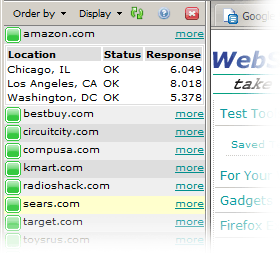 Try WebSitePulse Current Status


Before you go, subscribe to get latest technology articles right in your mailbox!.