
Converting RSS Feed to HTML using JavaScript will help us to display the feed in your Website or Blog’s sidebar or widget. In this article we discuss bout a very simple RSS JavaScript Feed Reader. This JavaScript feed reader can be used to display your favorite feed in your page. The RSS feed reader will parse the XML feed and will convert into HTML. This HTML will be rendered as the content of a <DIV> element.
The RSS Feed Reader JavaScript utilizes the “XMLHttpRequest” or the ActiveXObject “Microsoft.XMLHTTP” libraries depending on the browser you use. This article focuses on how to parse the RSS feed XML and convert into corresponding HTML.
Related
- How to Display FeedBurner RSS Feed Subscriber Count As Text ?
- Display Any RSS Feed on Your Site Using PHP cURL And SimpleXML.
If you are using this code please ensure that you do proper testing before adding to your website or blog. You can apply CSS styles that suites your website color and layout. The following RSS Reader Script will display the feed as below.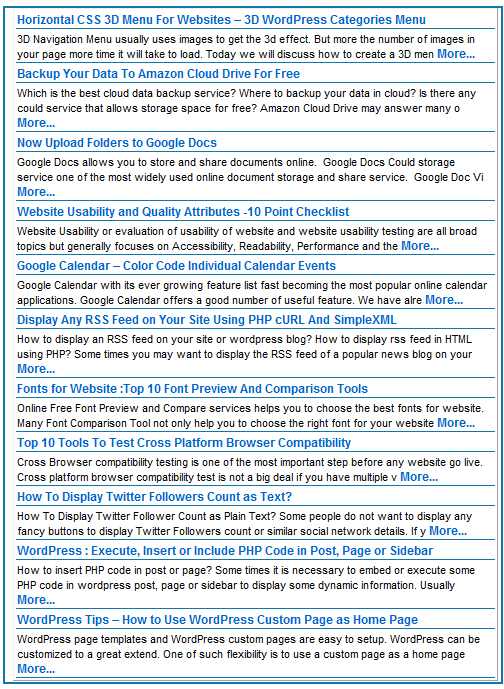
RSS JavaScript Reader
This is a simple function which fetches the RSS Feed from a URL and parses it. There are three main sections
Fetch RSS Feed
The following code gets the Feed content as XML.
1 2 3 4 5 6 7 8 9 10 11 12 13 | var xmlhttp;
if (window.XMLHttpRequest)
{// For IE7 and above, Firefox, Chrome, Opera, Safari
xmlhttp=new XMLHttpRequest();
}
else
{// For IE6, IE5
xmlhttp=new ActiveXObject("Microsoft.XMLHTTP");
}
xmlhttp.open("GET","http://feeds.feedburner.com/globinch?format=xml",false);
xmlhttp.send();
xmlDoc=xmlhttp.responseXML; |
In the above example we have used the Globinch.com RSS feed which is served from Google Feedburner. You need to replace “http://feeds.feedburner.com/globinch?format=xml” with the Feed URL that you want to display. The line “xmlDoc=xmlhttp.responseXML; ” retrieves the response XML from the XMLHttpRequest object.
Process the RSS Feed XML
Once the feed is retrieved you can start processing the feed. The “getElementsByTagName” method of XMLDoc object can be used to retrieve the XML elements present in the feed. For example if your feed is served from Google Feedburner you can use the below given code to process the XML.
1 2 3 4 5 6 7 8 9 10 11 12 13 14 15 16 17 18 19 20 21 22 | var strBuffer= "";
strBuffer = strBuffer +"<table border='1'>";
var x=xmlDoc.getElementsByTagName("item");
for (i=0;i<x.length;i++)
{
strBuffer = strBuffer +"<tr><td><span class="removed_link" title="";
strBuffer = strBuffer +(x[i].getElementsByTagName("link")[0].childNodes[0].nodeValue);
strBuffer = strBuffer +"">";
strBuffer = strBuffer +(x[i].getElementsByTagName("title")[0].childNodes[0].nodeValue);
strBuffer = strBuffer +"</span></td></tr><tr><td>";
strBuffer = strBuffer +(x[i].getElementsByTagName("description")[0].childNodes[0].nodeValue.substring(0,180));
strBuffer = strBuffer + "<span class="removed_link" title="";
strBuffer = strBuffer +(x[i].getElementsByTagName("link")[0].childNodes[0].nodeValue);
strBuffer = strBuffer +"">... Read More...</span>";
strBuffer = strBuffer +"</td></tr>";
if(i==10){
break;
}
}
strBuffer = strBuffer +"</table>";
document.getElementById(param).innerHTML =strBuffer; |
In the above code based on the structure of the XML feed you may need to change the getElementsByTagName() method parameter name. We are building an HTML table using the Title, Description and Link fields from the RSS feed. The last line is to set the Value of the DIV as the processed RSS feed HTML. The parameter “param” is the JavaScript function parameter which will be passed from where the function is invoked.
Add the RSS Feed HTML to your Website
The below given example defines a DIV element which is a place holder for the processed RSS Feed HTML.
1 2 3 | <body onload ="loadRSSFeed('feeddisplay');">
<div ID="feeddisplay"></div>
</body> |
In the above code the “loadRSSFeed” is the JavaScript function name and we are passing the “id” of the “DIV” as a parameter. This is the DIV element where we display the RSS feed.
You can apply some CSS styles to the created RSS feed HTML. You can use the following sample CSS styles.
1 2 3 4 5 6 7 8 9 10 11 12 13 14 15 16 17 18 19 20 21 22 23 24 25 26 27 28 29 30 31 32 33 34 35 36 37 38 | <style>
#feeddisplay {
background: none repeat scroll 0 0 ##ffffff;
border-bottom: 0.2em solid #1177AA;
border-right: 0.2em solid #1177AA;
border-left: 0.2em solid #1177AA;
border-top: 0.2em solid #1177AA;
color: #222222;
direction: ltr;
font-family: HelveticaNeue,Arial,Helvetica,sans-serif;
font-size: 12px;
font-style: normal;
font-weight: 700;
letter-spacing: normal;
line-height: 30px;
margin-left: 0;
padding: 0 3px 0 8px;
text-align: start;
text-decoration: none;
text-transform: none;
vertical-align: baseline;
width: 500px;
word-spacing: 0;
}
#feeddisplay td
{
font-size: 11px;
border:0px;
border-bottom: 1px solid #1177AA;
}
#feeddisplay a
{
font-size: 12px;
font-weight:bold;
text-decoration: none;
}
</style> |
You can customize the above JavaScript and CSS Styles that suites your requirement.


Before you go, subscribe to get latest technology articles right in your mailbox!.
Have you ever tested this code snippet? Its not working..
Wasted my precious time this…
It should not fail. Because we are using XMLDoc object. May the way you implemented the code is not proper
Hi Binu,
Thanks for sharing the code. It is working perfectly and I applied my own CSS styles to that. Thanks again
Dom
Kudos!
Perfect. Ideal for websites. I have created my own widget using this code and with your permission 🙂
Thanks again
Krishna
I was looking for similar JavaScript code. Thanks ! It worked!
@Dom, Krishna and Silvia
Thanks for visiting globinch and sharing your comments
Thanks for the piece of code. As Binu replied to Mohit the code uses XMLHttpRequest and XMLDoc objects. May be Mohit can recheck his version of implementation of the above code.
For me this code works like charm 🙂
Hi Binu,
I have tried another method code, basicly same with your code. But I don't know why it not work, because when I try the code from you its also not work. Can you give some idea?
Could you please share the error what you are getting?
Hi
Thanks so much for the code, It does not work on firefox also on the server it does not work
Can you please help
regards