
How to Disable Orbit Downloader 404 Error Redirect Page and how to change the browser start page from Orbit home page back to your own home page is a common problem faced by many Orbit users.
Orbit Downloader is one of the most used downloader software for Microsoft Windows. Orbit Downloader is a freeware download manager. Apart from downloading the normal files Orbit allows you to grab and download embedded Flash Video files from sites like Dailymotion .
It is compatible with all major browsers like Mozilla Firefox, Internet Explorer, Google Chrome, and Opera. Like other downloader software Orbit Downloader accelerates downloads by acting as a peer-to-peer client i.e utilizing bandwidth of other users.
You will face few issues with Orbit Downloader if you leave the default settings as it is. Let us see the most common issues.
Browser Homepage changes to Orbit start page.
Users who install Orbit Downloader will notice that their home page has been changed to an Orbit-branded version of Google, and the default search box in Internet Explorer has also been changed to the Orbit search function. This is easily avoided, however, by un-checking the appropriate boxes during the installation of the program. See below screen-shot.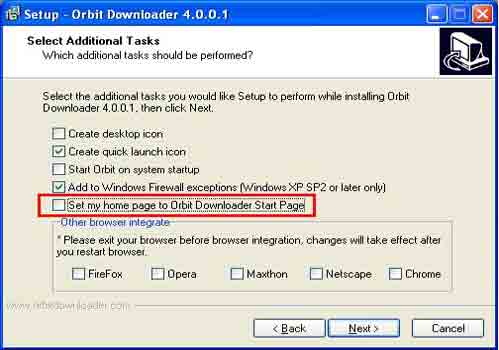
Orbit Downloader hijacks all HTTP 404 error pages and redirects them to an Orbit search page.
By default Orbit hijacks all HTTP 404 error pages and redirects them to an Orbit search page. The error page hijacking takes place every time a server is either not found or returns a 404 reply.This will override any actual 404 page returned by the web site.This is the default behavior of Orbit Downloader. This functionality can be disabled in the preferences of Orbit Downloader.
This can be avoided by removing the option in the preference screen (Menu-> Tools->Preference). See below.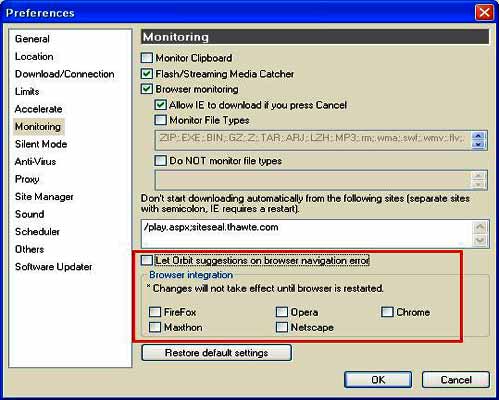


Before you go, subscribe to get latest technology articles right in your mailbox!.