
Create Colored PDF file From Any Windows Program For Free
There are many free PDF converter tools that allow PDF creation from documents. But almost all of them leave a watermark or an image on the generated PDF file. If no watermark then they enforce a limit to the maximum number of pages that you can convert into PDF documents. Doro PDF is a free tool that install an additional printer named “Doro PDF Writer‘. Th generated PDF retains the colors, images and layouts. In fact the generated PDF will have the exact content that the original document has.
Install and Use Doro PDF
- Download and install the Doro PDF.
- One any windows document of tool and select “Print”.
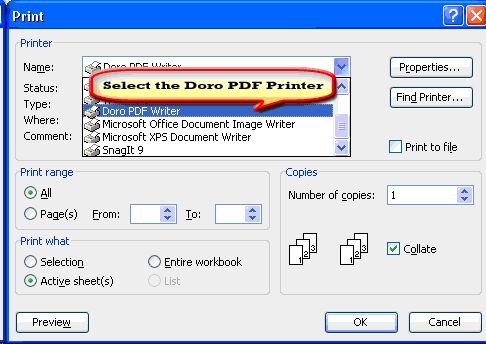
- In the resulting windows dialog box, select “Doro PDF Writer’” as your printer. This will select the Doro PDF printer and click OK. See below.
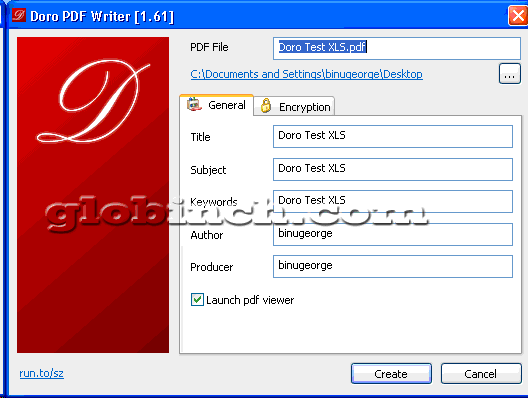
- In the next screen you can set the basic information of the PDF.See below.
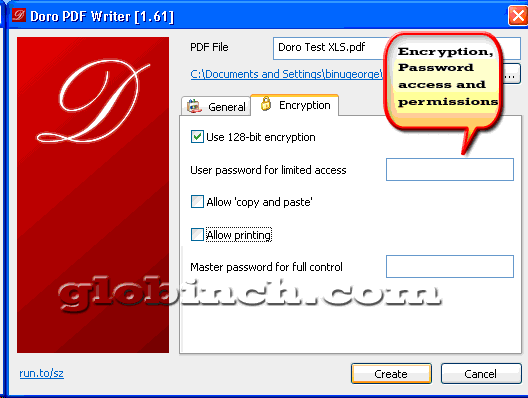
- In the next screen you can setup the details of the file. Also one important feature of this tool is that you can encrypt the PDF with 128-bit password protection. Apart from this, you can prevent ‘copy and paste‘ and printing of the generated PDF document. See below.
Doro is really useful when you want to do a “Save as PDF” on any document in windows. It retains the colors and image in the generated PDF document.
System Requirements
The Doro PDF works under
- Windows 7 [32 and 64 Bit]
- Windows Vista [32 and 64 Bit]
- Windows 2003 Server [
- Terminal Services / Citrix XenApp with multiple concurrent users]
Binu George , the author of Globinch.com, is a technology blogger and software architect. You can follow him on Twitter, Google+, Facebook.
If you enjoyed reading the above article please consider sharing it.
-
http://, Sarah S
Join Globinch on Social Media
Follow Globinch
Popular Posts
- Turn your Windows 7 Computer Into a Personal Wi-Fi Hotspot 20 comment(s) | 26,498 view(s)
- Search Engines for File Sharing Sites : Rapidshare Search, Megaupload and More 2 comment(s) | 18,457 view(s)
- Google Translate Now supports Bengali, Gujarati, Kannada, Tamil and Telugu 2 comment(s) | 17,346 view(s)
- Best PDF OCR Tools to Convert Scanned images to Text / Word Documents 4 comment(s) | 13,642 view(s)
- Google Top Searches Today – Hot Google Search Words today 8 comment(s) | 13,504 view(s)
- Globinch Search 0 comment(s) | 10,389 view(s)
- Access Blocked sites, Unblock Restricted Websites 16 comment(s) | 9,453 view(s)
- Password Revealer – How To Reveal- Show Password Behind Asterisks? 1 comment(s) | 8,517 view(s)
- Play Angry Birds Game Free and Offline in Chrome Browser 1 comment(s) | 8,244 view(s)
- Free Online OCR Software to Convert Images Into Searchable PDF, Doc, HTML or Text 2 comment(s) | 8,083 view(s)
Recent Articles
- How to Use Wi-Fi the Secure Way
- 5 Apps to Boost Android Performance
- Building a Smarter Site Using a WordPress Platform
- Samsung Galaxy S IV Smartphone :Summary of All the Radical Innovations
- 5 Killer Tips to Increase Traffic to Your Blog
- Domain Parking to Make Genuine Money Online
- SEO Is Not Dead, But You Need to Upgrade The Process
- A Complete SEO Guide on Using Social Media for Better SERPs
- When Should You Use Geotargeting or Setting Geographic Target in Google Webmaster Tools?
- How To Optimize Your Google+ Page And Profile For Search Engines


