
Free PDF converter programs which convert word to PDF or any office documents to PDF will be really useful for any computer user.
There are many PDF programs available in the market to convert file from and to to PDF fromat. There are many programs to convert scanned PDF images to other format documents. We have discussed about Best PDF OCR Tools to Convert Scanned images to Text / Word , how to split and merge large PDF documents and also we discussed about many OCR tools which helps us to convert scanned images PDF files to text or word format. We discussed about Google Docs OCR Service to Convert Scanned PDF Images to Text and also about PDF restriction remover services available online .
Let us see few free and good tools which you can use to convert any MS office documents to PDF format. We have already discussed free PDF to Word converters
Free tools to convert office documents to PDF
Let us check few tools which can be used to convert any MS office documents to PDF.
doPDF free PDF creator
 DoPDF is a free PDF creator from Softland for personal and commercial use and can be used for converting office documents into PDF documents. doPDF Apart from to create PDF files from your Microsoft Office® documents you can also convert web pages and emails to PDF format. DoPDF works with Office® 2000 or higher. Using this tool you can create PDF files from your Microsoft® Excel®, Microsoft® Word, Microsoft® PowerPoint® documents
doPDF installs as a PDF printer driver so to create PDF files you just have to print the document to the doPDF free pdf creator. Open any document or web page and choose Print and select doPDF as printer. It will ask you where to save the PDF file and on completions the PDF file will be automatically opened in your default PDF viewer.
Requirements
- Microsoft® Windows 2000
- Windows XP
- Windows 2003
- Windows Vista
WinPDF PDF creator
 WinPDF is another free tool from TopByteLabs Ltd. that allows you to convert office documents to PDF format. WinPDF Creates pdf files from any windows based software that has the possibility to print. WinPDF also adds a printer driver and can be used to convert any document to PDF format.
Another very important feature supported by WinPDF is the Security Settings. Secure your PDF documents by using passwords. You have the choice from creating a user password and a master password. Two Encryption Levels are available to restrict permissions for users in printing documents, changing documents, copying or extracting content documents or adding and changing comments and form fields of documents. See below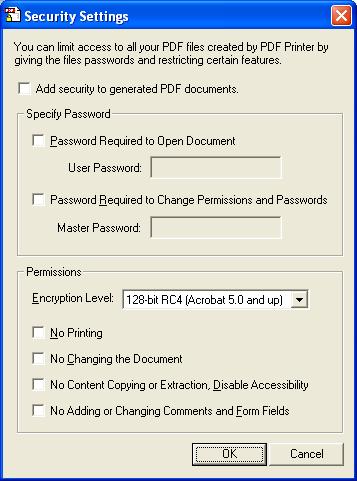
You can also select the Graphics and paper quality options during printing.
Download WinPDF


Before you go, subscribe to get latest technology articles right in your mailbox!.