In Part 1 and 2 of the Website performance optimization series We have analysed
7 steps to Speed up website loading – Faster Website Tips -Part 1
and
Speed up website -Compress CSS/JavaScript uing GZIP/DEFLATE data compression-Optimization Tips Part2 .
Those steps are really essential to make sure that the website performance and loading time is faster.
But how do we really check whether your website is serving compressed scripts or not?
One way to achieve this by checking the response header from the server. But to check this manually is bit difficult.To help us in this we have few wonderful tools available here.
1.Firebug firefox add-on (Read more about firebug here)
Firebug is the most popular web development tool for Firefox.Install the add-on and you can verify the data compression and speed related issues using the tool.
Get Firebug from Here or Here.
Click the FireBug icon in the right hand side of your Firefox status bar. This will open a window and click the “Page Speed” menu and then click the “Analyse performance” button.
This will do a series of checks and validations.Once the validation is over the tool will display the summary as shown below.Click the Performance sub menu in the result window.
Check for the “Enable Compression” in the tree structured results.If your website is not optimized for data compression this will not show a tick mark. Instead it will show a red icon.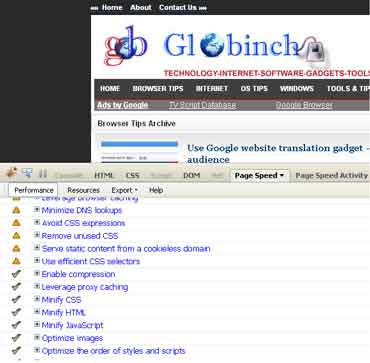
Expand this entry and will show the suggestions and the list of files which needs compression.
Now click the “Resources” menu. This will show the list of files served from the server. Select any of the file and check the Request and response headers.Verify the “Content-Encoding” header in the Response Header.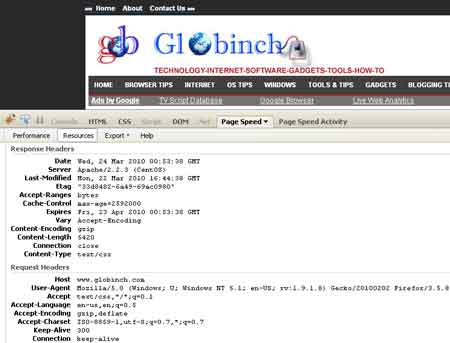
2. Online service to check web page compression / deflate / gzip
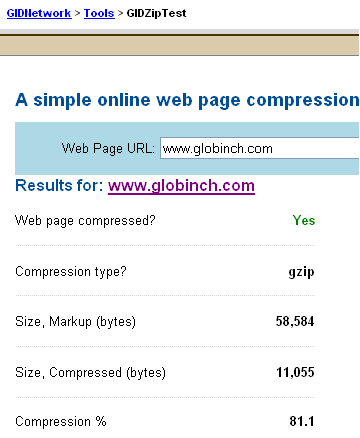
There is a neat tool available to check whether your website is optimized for GZIP compression or not.
The online tool is provided by GIDNetwork and you can try it here.
See the sample result below.This tool will also gives you the Response Headers as well as the page source.