
Check website/ web page for css/script Gzip/ Deflate compression – Optimization Tips -Part 3
In Part 1 and 2 of the Website performance optimization series We have analyzed
7 steps to Speed up website loading – Faster Website Tips -Part 1
and
Speed up website -Compress CSS/JavaScript uing GZIP/DEFLATE data compression-Optimization Tips Part2 .
Those steps are really essential to make sure that the website performance and loading time is faster.
But how do we really check whether your website is serving compressed scripts or not?
One way to achieve this by checking the response header from the server. But to check this manually is bit difficult.To help us in this we have few wonderful tools available here.
1.Firebug firefox add-on (Read more about firebug here)
Firebug is the most popular web development tool for Firefox.Install the add-on and you can verify the data compression and speed related issues using the tool.
Get Firebug from Here or Here.
Click the FireBug icon in the right hand side of your Firefox status bar. This will open a window and click the “Page Speed” menu and then click the “Analyse performance” button.
This will do a series of checks and validations.Once the validation is over the tool will display the summary as shown below.Click the Performance sub menu in the result window.
Check for the “Enable Compression” in the tree structured results.If your website is not optimized for data compression this will not show a tick mark. Instead it will show a red icon.
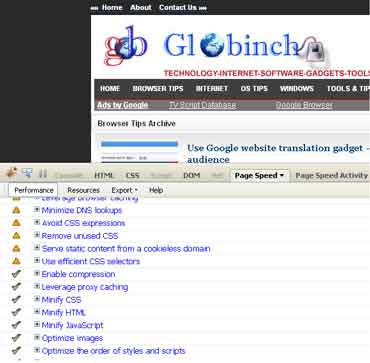
Expand this entry and will show the suggestions and the list of files which needs compression.
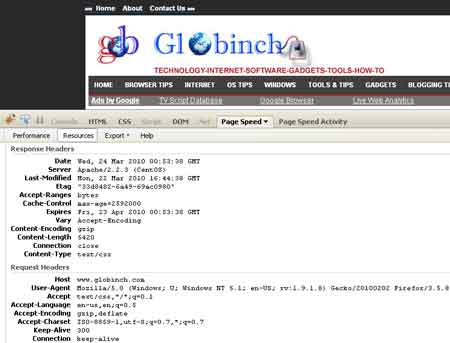
Now click the “Resources” menu. This will show the list of files served from the server. Select any of the file and check the Request and response headers.Verify the “Content-Encoding” header in the Response Header.
2. Online service to check web page compression / deflate / gzip
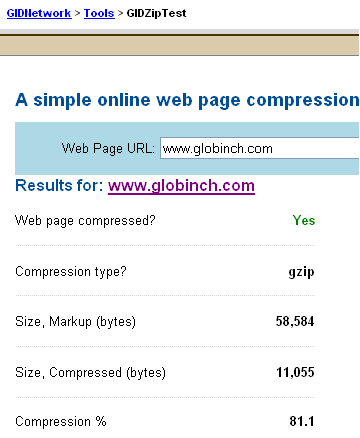
There is a neat tool available to check whether your website is optimized for GZIP compression or not.
The online tool is provided by GIDNetwork and you can try it here.
See the sample result below.This tool will also gives you the Response Headers as well as the page source.
Sign up or join Globinch on Social Media
Stay Connected
Follow globinch
Popular Posts
- Search Engines for File Sharing Sites : Rapidshare Search, Megaupload and More 6 comment(s) | 16258 view(s)
- Turn your Windows 7 Computer Into a Personal Wi-Fi Hotspot 15 comment(s) | 16117 view(s)
- Google Translate Now supports Bengali, Gujarati, Kannada, Tamil and Telugu 2 comment(s) | 15714 view(s)
- Google Top Searches Today – Hot Google Search Words today 12 comment(s) | 11559 view(s)
- Best PDF OCR Tools to Convert Scanned images to Text / Word Documents 20 comment(s) | 10154 view(s)
- Globinch Search 0 comment(s) | 8401 view(s)
- Access Blocked sites, Unblock Restricted Websites 15 comment(s) | 7310 view(s)
- Free Online OCR Software to Convert Images Into Searchable PDF, Doc, HTML or Text 3 comment(s) | 7238 view(s)
- Password Revealer – How To Reveal- Show Password Behind Asterisks? 7 comment(s) | 7180 view(s)
- Play Angry Birds Game Free and Offline in Chrome Browser 1 comment(s) | 7049 view(s)
Recent Articles
- Best Free Tools to Enlarge Images without Losing Quality
- How to Track Your Gmail Email and Schedule Gmail Mail Free?
- Google Webmaster Unnatural Links Detected Warning & Penalty
- How to Use Trial Software Version Forever Without Expire
- How to Use Folder as Drive or Convert Folder to Drive?
- Add Buttons, Message Boxes and Text Highlights in WordPress Post
- Top 20 Free WordPress Social Share Plugins
- rel=”shortlink” Short URL Indicator and Its WordPress Support
- Pagination SEO Using rel=”next” and rel=”prev” Link Attributes
- Watch Live IPL 2012 Season 5 Online on Your Computer or Mobile


Pingback: Speed up website -Compress CSS/JavaScript using GZIP/DEFLATE compression - Optimization Tips - Part 2 | Globinch
Pingback: .htaccess Tutorial -A guide and .htaccess tricks and tips | Globinch
Pingback: 5 tools / online services To check your Website / Web page Load Speed | Globinch
Pingback: Best PDF OCR Tools to Convert Scanned images to Text / Word Documents | Globinch
Pingback: Top Tools to Optimize Images and Speed Up Your Site | Globinch
Pingback: How to Test your Website Speed Against Benchmarks? | Globinch
Pingback: Analyze Website or Page Performance Using Yslow and Google Page Speed | Globinch
Pingback: File Caching to Speed Up Website and Web Page Load Time | Globinch
Pingback: How to Optimize Images for Blog and Websites. Top tips for Image optimization. | Globinch
Pingback: How to Test Your Website Completely - Validate HTML,CSS , RSS, ATOM,Mobile compatibility | Globinch
Pingback: 7 steps to Speed up website loading - Website Optimization Tips | Globinch
Pingback: Top 10 tips : Speed Up Blog and Blog Speed Test and Load Time | Globinch
Pingback: Google Page Speed Online To Analyzes Web Page Performance and Page Load Speed | Globinch
Pingback: Google Closure Compiler to Minimize and Optimize JavaScript Online | Globinch
Pingback: Top 15 On Page Optimization Checklist | Globinch