
How to Turn Caret Browsing On or Off in Firefox and Internet Explorer 8
Caret Browsing in Firefox as well as in Internet Explorer (IE 8) allows you to use keyboard to select text and move around within a web page rather than using the mouse.You can use the standard navigation keys like HOME, END, PAGE UP, PAGE DOWN , arrow keys etc on your keyboard to select text, move around the web page or copy the text or image etc.
This may not be a a great tool for those who like to use mouse rather than keyboard while browsing, but is helpful to those who use keyboard keys and shortcuts more than the mouse.
How to To turn On or Turn Off Caret Browsing
In Internet Explorer and Firefox do one of the following:
Method 1.
To enter the Caret Browsing feature is very easy.
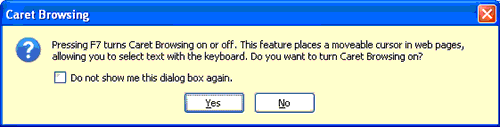
- Press F7
- In the popup click Yes to turn on Caret Browsing. (If already on you can close Caret browsing here).
- Click your mouse pointer once inside your webpage and you can start using the keyboard now.
- F7 toggles Caret Browsing when pressed when you are on browser window.
Method 2
How to disable Caret browsing in Firefox
Read it Here : How to disable Caret browsing in Firefox
How to disable Caret browsing in Internet Explorer 8
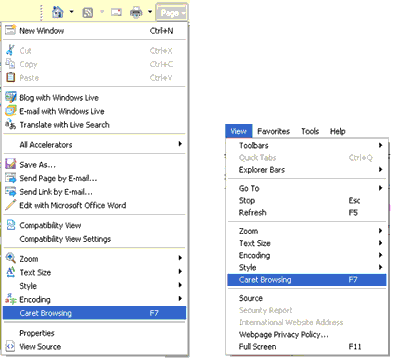
In Internet Explorer 8 you can turn off or turn on caret browsing through different options.
- Go to Menu View -> Caret Browsing and select or deselect the option.
- Go to Page button Page-> Caret Browsing
- Enable/Disable Caret Browsing for new windows and tabs check box needs to be selected in Tools->Internet Options -> Advanced Tab.
Join Globinch on Social Media
Follow Globinch
Popular Posts
- Turn your Windows 7 Computer Into a Personal Wi-Fi Hotspot 20 comment(s) | 26,426 view(s)
- Search Engines for File Sharing Sites : Rapidshare Search, Megaupload and More 2 comment(s) | 18,450 view(s)
- Google Translate Now supports Bengali, Gujarati, Kannada, Tamil and Telugu 2 comment(s) | 17,344 view(s)
- Best PDF OCR Tools to Convert Scanned images to Text / Word Documents 4 comment(s) | 13,605 view(s)
- Google Top Searches Today – Hot Google Search Words today 8 comment(s) | 13,496 view(s)
- Globinch Search 0 comment(s) | 10,377 view(s)
- Access Blocked sites, Unblock Restricted Websites 16 comment(s) | 9,452 view(s)
- Password Revealer – How To Reveal- Show Password Behind Asterisks? 1 comment(s) | 8,515 view(s)
- Play Angry Birds Game Free and Offline in Chrome Browser 1 comment(s) | 8,243 view(s)
- Free Online OCR Software to Convert Images Into Searchable PDF, Doc, HTML or Text 2 comment(s) | 8,082 view(s)
Recent Articles
- 5 Apps to Boost Android Performance
- Building a Smarter Site Using a WordPress Platform
- Samsung Galaxy S IV Smartphone :Summary of All the Radical Innovations
- 5 Killer Tips to Increase Traffic to Your Blog
- Domain Parking to Make Genuine Money Online
- SEO Is Not Dead, But You Need to Upgrade The Process
- A Complete SEO Guide on Using Social Media for Better SERPs
- When Should You Use Geotargeting or Setting Geographic Target in Google Webmaster Tools?
- How To Optimize Your Google+ Page And Profile For Search Engines
- Find Serial Numbers, Backup Product Keys of Installed Application in Windows


